#Tools & plans
OBDeleven vs Carista: Which is a better option for you? [2026]


![OBDeleven vs Carista: Which is a better option for you? [2026]](/_next/image?url=https%3A%2F%2Fobdeleven.com%2Fsylius_shop_api_original%2Fsylius_media%2Fbb%2Fd7%2F0f655a5e1817ed02568df82ce2c5.png&w=3840&q=75)
TL;DR: OBDeleven provides advanced diagnostics without a required subscription, simple customization through One-Click Apps, and manual coding for Volkswagen Group vehicles, making it suitable for both beginners and more advanced users. Carista supports a wider range of car brands, but advanced diagnostics require a subscription, and it does not offer manual coding.
If you're in the market for a car OBD scanner, you've probably come across two popular names: OBDeleven and Carista. Both tools offer a variety of features to help you diagnose, service, and customize your vehicle.
But which one is the right fit for you?
The answer depends on your vehicle model, feature needs, and level of expertise. In this article, we'll compare the features, pricing, and usability of OBDeleven and Carista to help you make the right decision.
For those who don't want to spend time reading, here’s a quick comparison of OBDeleven vs Carista in the table below:
| OBDeleven 3 | Carista EVO | |
| Official licenses | Volkswagen, BMW, Toyota, BMW, Ford (US), Mercedes-Benz Groups | Volkswagen Group |
| Subscriptions | Yes | Yes |
| OBD2 diagnostics | Yes | Yes |
| Advanced diagnostics |
Yes
|
Yes, but with subscription only |
| No-code customizations | Yes, purchased by in-app currency (Credits) | Yes, but with subscription only |
| SFD unlock | Yes | Yes, but no manual coding or adaptations |
| Professional VAG coding | Yes | No |
| MS-CAN (Ford) | Yes | Yes |
| SW-CAN (GM) | No | Yes |
| Service tools | Yes, some require Credits/subscriptions | Yes, but only with subscription |
| Live data | Yes | Yes |
| Vehicle limit | No limit – you can add as many vehicles as you like for free | No limit – you can add as many vehicles as you like for free |
| Extra in-app features | Yes, Mileage check, Hybrid battery check, Car inspection, Car alerts, Trip tracker, Maintenance reminders & more | None |
| Carplay & Android Auto compatibility | Yes | No |
| Device price |
€84.99
FREE plan features included
|
$48.99-$68.05 (€41.42-€57.46)
No subscription included, varies per region
|
Note: For Carista, no-code customizations, SFD unlock, service tools, and live data features are available only with a subscription. For OBDeleven, no-code customizations can be bought on the go, and only professional VAG coding requires a subscription.
What is OBDeleven?
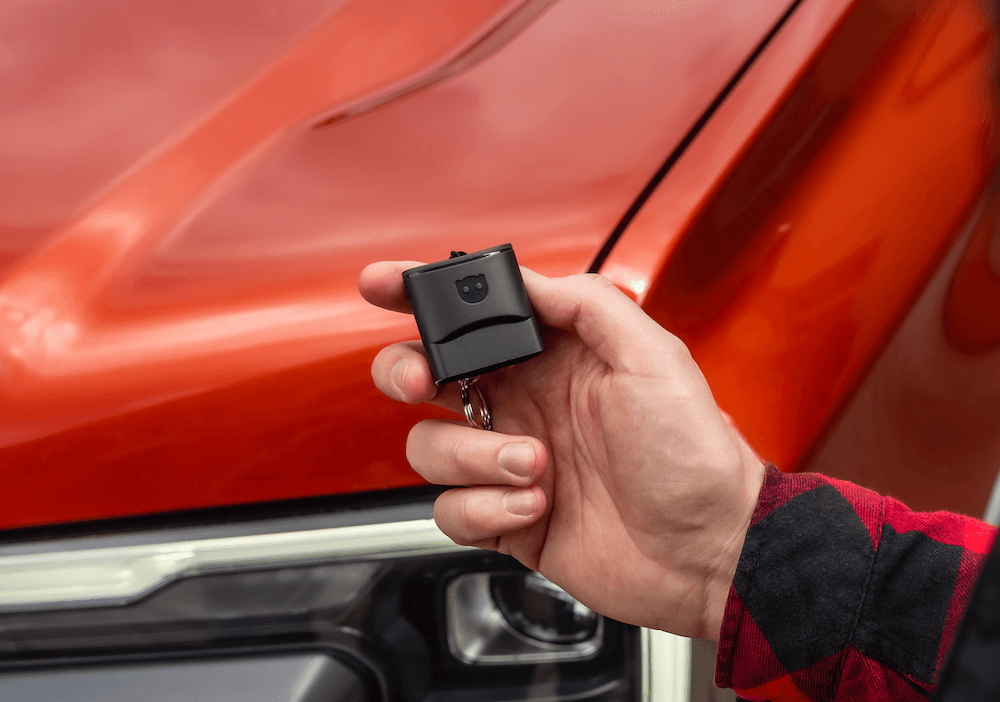
OBDeleven’s main and newest device is OBDeleven 3 – a pocket-sized Bluetooth tool that plugs into your car’s OBD2 port. Once connected, it pairs with the OBDeleven mobile app on your smartphone, allowing you to run in-depth diagnostics directly from your phone.
With OBDeleven, you can scan and clear diagnostic trouble codes across multiple control units (not just the engine), view detailed diagnostic trouble codes with supporting information, and access live data from the vehicle in real time.
The app also supports a range of service and maintenance functions, such as brake pad replacement, battery change and registration, service reminder resets, and more.
OBDeleven also stands out for its customization capabilities, especially pre-coded One-Click Apps. These let you enable comfort, styling, and hidden manufacturer settings in just one tap for Volkswagen, BMW, Toyota Group, Ford (US), and Mercedes-Benz vehicles – no coding knowledge required. For those who want to go further, OBDeleven offers manual coding and adaptations for Volkswagen Group vehicles, giving advanced users access to workshop-level functionality in a user-friendly format.
Beyond diagnostics and customization, OBDeleven offers many in-app features to help you inspect used cars more thoroughly and check emissions readiness, hybrid battery health, and vehicle mileage.
Overall, it’s a well-rounded tool suitable for both beginners and experienced enthusiasts.

What is Carista?
Carista’s OBD lineup includes two devices – the Carista OBD Reader and the Carista EVO Scanner. Both are Bluetooth-based, plug into the car’s OBD2 port, and are operated through the Carista app on Android and iOS.
The main difference is capability.
The Carista OBD Reader is the more basic option, intended for standard diagnostics and maintenance. It supports reading and clearing fault codes (including engine, ABS, SRS/airbag, and transmission), checking check engine light issues, viewing live data, accessing supported customization settings, and performing common service procedures.
The Carista EVO Scanner is the more advanced device, with faster connectivity, wider vehicle compatibility, and support for additional protocols. This can enable more stable performance and broader feature coverage depending on the vehicle.
Compared to the basic Carista OBD Reader, the EVO scanner is closer to OBDeleven 3 in terms of overall feature scope. However, while Carista lists SFD unlocking for Volkswagen Group vehicles, it doesn’t provide manual long-coding or adaptation-style access like OBDeleven does. Instead, Carista mainly relies on app-based, pre-defined options – though these aren’t structured entirely as OBDeleven-style One-Click Apps either.
All this could make Carista a good fit for regular drivers too, but less so for professionals or advanced users who want deeper access.
Compatibility
OBDeleven 3 works with most modern vehicles, particularly 2008+ models that use the CAN-bus protocol. Advanced diagnostics and One-Click Apps are available for officially licensed brands, including Volkswagen Group, BMW Group, Toyota Group, US-manufactured Ford, and Mercedes-Benz vehicles, while manual coding and adaptations are offered exclusively for Volkswagen Group cars.
Note: For a complete list of supported OBDeleven vehicle models, click here.
Meanwhile, the Carista EVO is also compatible with a wide range of car brands: Audi, BMW, Buick, Cadillac, Chevrolet, Cupra, Dacia, Ford, and many more. However, available features depend on your vehicle’s make, model, and year. SFD unlock is available for all VW Group vehicles made up to 2023, and Opel/Vauxhall support after 2017 is not guaranteed.
Both OBDeleven 3 and Carista EVO support the MS-CAN protocol, which enables broader access and control for compatible Ford vehicles (US-manufactured models only in OBDeleven’s case). However, if you drive a GM or Chevrolet, keep in mind that only the Carista EVO supports the SW-CAN (GM) protocol.
Coming back to the is a former version of the Carista scanner, The Carista OBD Reader, the main difference is that it’s compatible with a narrower range of vehicle models: Volkswagen Group vehicles made up to 2019 (Volkswagen, Audi, SEAT, Škoda), Toyota Group (Toyota, Lexus), as well as BMW, MINI, Nissan, Scion, and Infiniti.
Official licensing
One of OBDeleven’s main advantages is its official licensing from major automakers:
- Volkswagen Group (includes Audi, Volkswagen, Škoda, SEAT, CUPRA, Bentley, Lamborghini)
- BMW Group (includes BMW, MINI, Rolls-Royce)
- Toyota Group (includes Toyota, Lexus)
- Ford Group (US models only)
- Mercedes-Benz
OBDeleven has been thoroughly tested to meet each manufacturer's standards, ensuring safe, reliable operation and reducing the risk of system issues.
You should note, however, that while OBDeleven itself is designed for safety, improper use – such as disabling safety features – may still impact your vehicle and its warranty coverage. Always review each function and use caution when making changes to your vehicle’s systems.
According to their website, Carista is also a Volkswagen Group partner and offers the SFD unlock function for Volkswagen Group models made until 2023. However, this only shows up in pre-coded functions, as Carista does not have manual coding or adaptation capabilities.
Diagnostics
OBDeleven
OBDeleven 3 includes both basic and advanced diagnostics without requiring additional payments or subscriptions.
It also supports standard OBD diagnostics on practically all modern vehicles made from 2008 onwards, allowing you to read and clear fault codes and view engine live data.
So, whether you drive a Mercedes, Mazda, Peugeot, or another brand, you can use OBDeleven to scan your engine and view fault codes. Every fault code has a handy Google button for quick searches tailored to your vehicle and automatically generated AI fault explanations.
But Advanced diagnostics take it one step further – giving you access to every available control unit in your car, not just the engine. This includes transmission, ABS, airbags, multimedia, air conditioning, electronics, steering, and more. Available for officially licensed vehicles from the Volkswagen Group, Toyota & Lexus, BMW Group, Ford (US), and Mercedes-Benz. The exact list of supported control units depends on your vehicle model and equipment.
Here’s how it works:
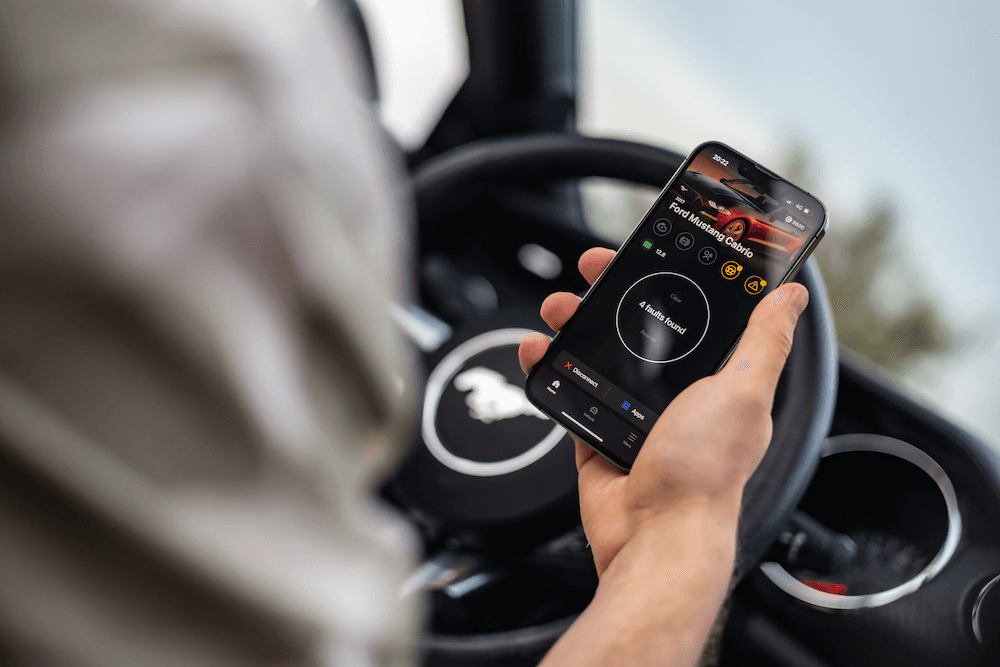
- You plug your OBDeleven 3 device into your car’s OBD2 port and connect it to your smartphone via Bluetooth. The device will automatically identify your vehicle, so there’s no need to manually enter your VIN or scroll through long lists to search for your car model.
- Then, you scan all the systems. Depending on the car's make and available control units, it might take up to a few minutes.
- Finally, you get a list of all detected control units, with clear indicators if any have faults.

For Volkswagen Group vehicles
You can dig deeper into each control unit to view detailed data, such as system descriptions, ODX names and versions, serial numbers, protocols, and software/hardware details.
Fault codes come with extra information, too. You’ll see the fault name, code, and status (passive or active). Plus, there’s a direct link to Google for instant search results tailored to your car model.
Carista
Carista allows you to diagnose a wide range of electronic control units in your vehicle, including the engine, transmission, ABS, power steering, airbags, and more. The list of accessible units depends on your vehicle model and equipment.
Despite that, not all is available with the free version of Carista - you'll need a paid Carista App Pro subscription for deeper diagnostics to read or clear codes from all control units.
With the free version, you can only run basic-level OBD2 diagnostics, which primarily engine and emissions-related issues.
Live data and freeze frame data (for Volkswagen Group)
OBDeleven
The OBDeleven app offers two powerful diagnostic features: live data and freeze frame data.
Live data provides real-time information from each sensor or relay in your vehicle, tracks the operation of every component, and helps pinpoint malfunctions. Modern cars offer access to hundreds or even thousands of live data channels, such as boost pressure, fuel pressure, diesel particulate filter (DPF) soot level, intake air temperature, battery voltage, and more.
Android users of the OBDeleven app can also log these values in charts for more in-depth analysis.
Freeze frame data captures a snapshot of your vehicle’s condition when a fault code is triggered. It records key data points to show exactly what happened when the problem occurred.
Example:
If your check engine light comes on with a fault code for fuel trim being too lean, freeze frame data might show it happened at high RPMs. This could indicate a few possible causes, such as an inefficient fuel pump or overboost conditions.
Then, as you monitor the live data while driving, you may notice further clues. For instance, if the boost pressure stays within limits, but fuel pressure drops noticeably under hard acceleration, this points to low fuel pressure under heavy load.
By learning how to read live data, you can narrow down the issue more effectively and focus on fixing the low fuel pressure.
Carista
Carista’s Live Data feature lets you track essential vehicle performance metrics in a similar way, though the specific data available depends on your car model.
While it doesn't provide all the live data channels available from your vehicle, Carista organizes the most commonly used parameters into clear, grouped lists for easier diagnostics.
For example:
- The Transmission live data group shows you fluid temperature and pressure
- The Service interval info group tracks the time and mileage since the last service, the type of service, and any upcoming or overdue services
- The Wheel speed live data group can identify ABS sensor problems or a flat tire
- The Engine data group provides information on engine speed, coolant temperature, and fuel consumption
This streamlined approach makes the app simple and easy to use without overwhelming you with too much information.
However, for VAG users who need more detailed analysis, the lack of charting feature could be a limitation.
Note: Both OBDeleven 3 and Carista support basic OBD2 live data on their supported vehicles, showing real-time engine parameters (and, where available, transmission ECUs). Meanwhile, Advanced live data with OBDeleven 3 is available for officially supported brands, while for the Carista EVO scanner, it depends on the specific vehicle model and year.
customizations
OBDeleven
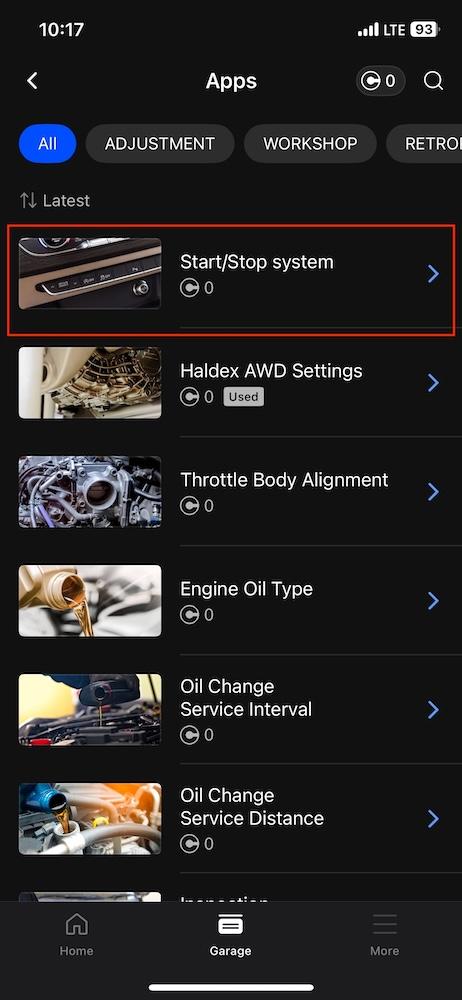
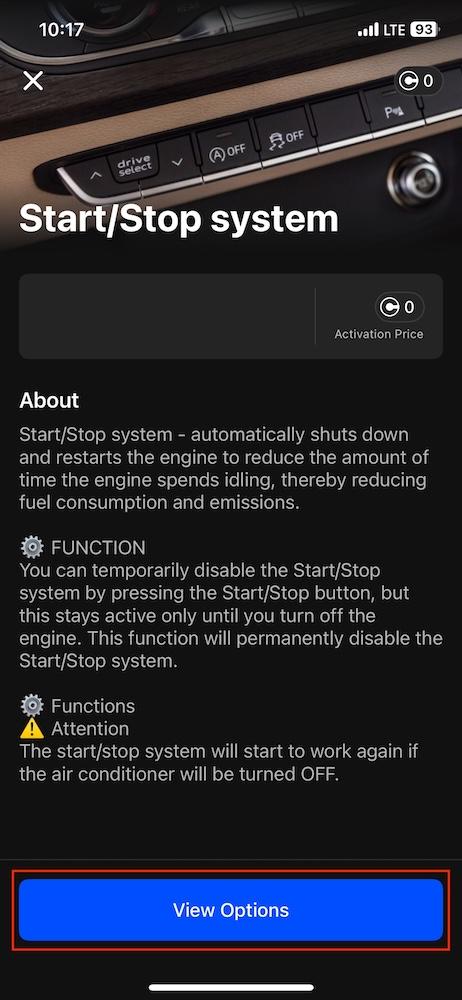
With One-Click Apps, you can easily customize your car. You can adjust, enable, or disable safety, comfort, and driving features with just a single tap on the screen.
It's like coding, but without the hassle – no special knowledge or technical skills are required. Each One-Click App has a detailed description with an image. All you have to do is select the feature you want and activate it.
What can you do with One-Click Apps?
Here are some examples of what you can customize:
- Integrate retrofitted parts like parking sensors, LED lights, or tow hitch
- Reset service lights – like oil change and service inspection
- Activate features like video in motion, wireless CarPlay, auto folding mirrors, needle sweep gauge test, or dynamic turn signals
- Deactivate unwanted functions, such as the engine Start/Stop system, open door alarm, or electronic stability control (ESC) system
- Customize door locking functions or window controls, like closing windows with the remote key or enabling keyless door unlocking
- Change dashboard colors or even switch up the entire theme
- And more
The options depend on your car’s make, model, and equipment. Some models offer more features than others, but if you own a Volkswagen Group, BMW Group, Toyota Group, Ford US, or Mercedes-Benz vehicle, you’ll definitely find plenty of options here.
Note: If you change a feature with a One-Click App, you can quickly revert to the original setting by using the same One-Click App and selecting the previous value. Keep in mind, this will count as an additional One-Click App usage and will require Credits.
OBDeleven's One-Click Apps can also simplify routine maintenance by providing tools for a variety of tasks:
- Reset or adjust service and oil change indicators
- Register a new battery after replacement
- Calibrate adaptive cruise control
- Prime the fuel system after a fuel filter or pump change
- Release the electronic parking brake for rear brake pad replacement
- And more
Available service One-Click Apps vary by vehicle model. You can check what One-Click Apps are available for your specific vehicle right here.

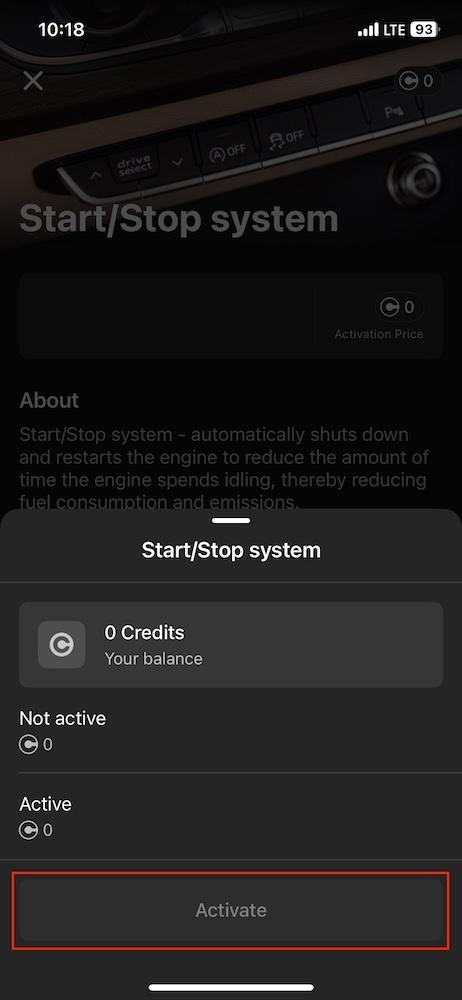
How to access One-Click Apps?
You can activate One-Click Apps with our in-app currency – Credits, which you can get straight from the OBDeleven store. Most features cost 10 Credits.
One-Click Apps are included in the ULTIMATE plan benefits, meaning that with this subscription, you can use One-Click Apps nearly as much as you want at no additional cost.
Tip: You can also take a look at this quick A-to-Z guide to get you started with One-Click Apps.
Carista
Carista also lets you explore and unlock hidden settings in your car, offering a range of easy-to-use customization options.
Available customizations vary by vehicle model, too. For example, BMW owners can adjust settings for auto start/stop, dashboard appearance, lights, locks, mirrors, parking sensors, windows, and the sunroof. Toyota owners can modify settings like warnings, driver assistance, climate controls, and trunk features.
To see all available customizations for your vehicle, visit the Carista website.
SFD unlock for Volkswagen Group vehicles
In 2020, Volkswagen AG introduced the SFD (Schutz Fahrzeug Diagnose) protection to limit unauthorized vehicle modifications. It restricts functions such as adaptations and coding.
This change didn’t affect all VAG models at once, but those built on the MQB Evo and MEB platforms. Popular models with SFD lock include VW Golf 8, Škoda Octavia IV, and Audi A3 8Y.
OBDeleven’s solution:
OBDeleven, as an officially licensed tool, can unlock SFD protection. It offers an SFD auto-unlock feature that makes bypassing this protection simple. When you try to modify a locked control unit, the app automatically requests an SFD token from Volkswagen’s servers to unlock it – seamlessly and without extra effort on your part.
What it means for you:
- You can fully customize your vehicle’s settings
- All changes are made safely, legally, and align with Volkswagen’s security protocols
- There’s no need for complicated workarounds or manual requests – OBDeleven handles everything automatically
In comparison, the Carista EVO Scanner also includes SFD unlock capability for VW Group models among its supported advanced features. However, unlike the OBDeleven app, the Carista app doesn't offer advanced coding features, so this bypass is used in practice via Carista’s pre-coded customization functions.
Note: In the latest new or renewed Volkswagen Group vehicles (mainly made from 2024 onwards), a second-generation vehicle diagnostic protection system, commonly known as SFD2, has been introduced. This new protection layer limits manual coding capabilities. OBDeleven is actively working to implement an SFD2 unlock solution for its users.
VAG coding & adaptations
For more tech-savvy users, this is where the real fun begins.
OBDeleven offers advanced coding and adaptations specifically for Volkswagen Group (VAG) vehicles. These features allow you to customize and fine-tune a wide range of settings within your vehicle's electronic control units (ECUs), much like a professional mechanic.
Key functions include:
- Coding, and long coding
- Adaptations and long adaptations
- Control unit backup
- Basic settings
- Control unit reset (UDS)
- Sub-control unit coding
While OBDeleven makes these advanced features accessible, a solid understanding of vehicle systems is important to avoid unintended issues.
However, you can minimize mistakes by using the control unit's backup feature before making changes. This allows you to restore the original settings if necessary. Note that you can't revert basic settings, so be extra careful with it.
All these advanced features are available with the PRO plan, which costs €59.99 per year.
Note that, unlike the OBDeleven app, the Carista app doesn’t offer advanced coding features.
Service tools
OBDeleven provides a broad set of service and maintenance functions, especially on officially supported brands. On Volkswagen Group vehicles, for example, OBDeleven can reset service and oil change intervals, register a new battery after replacement, perform electronic parking brake (EPB) service, adapt throttle and other components, register TPMS sensors, and execute various output tests.
The exact service tools available depend on the specific vehicle model and year, and coverage is generally deeper on supported brands such as Volkswagen Group, BMW Group, Toyota Group, and US-manufactured Ford vehicles.
To compare, Carista also offers a range of service tools to assist with routine maintenance tasks. For Volkswagen Group models, Carista can reset service and oil change indicators, register a new battery after replacement, prime the fuel system, access detailed ECU information, and perform emission tests.
BMW Group vehicles have options to force DPF regeneration and open the electronic parking brake for rear brake pad replacement. These can be done with OBDeleven too.
Available service tools vary by vehicle model.
Extra features
OBDeleven helps you monitor your car’s long-term reliability with a set of built-in health checks:
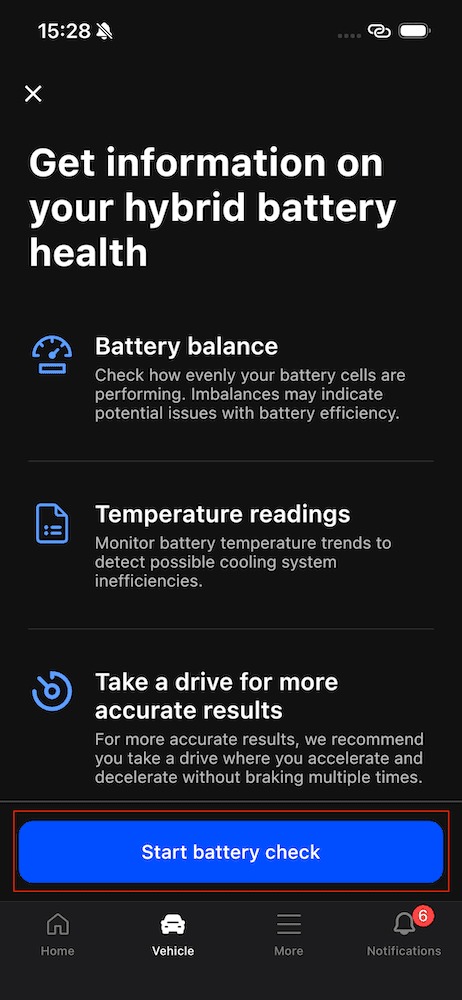
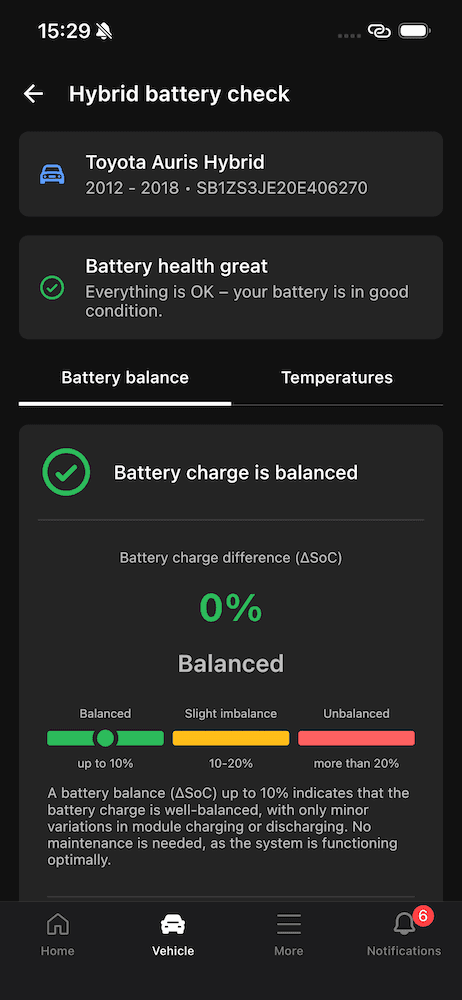
- Hybrid battery check (exclusive to Toyota and Lexus) provides a clear overview of your hybrid battery’s condition and potential degradation, so you can track how well it’s performing over time.
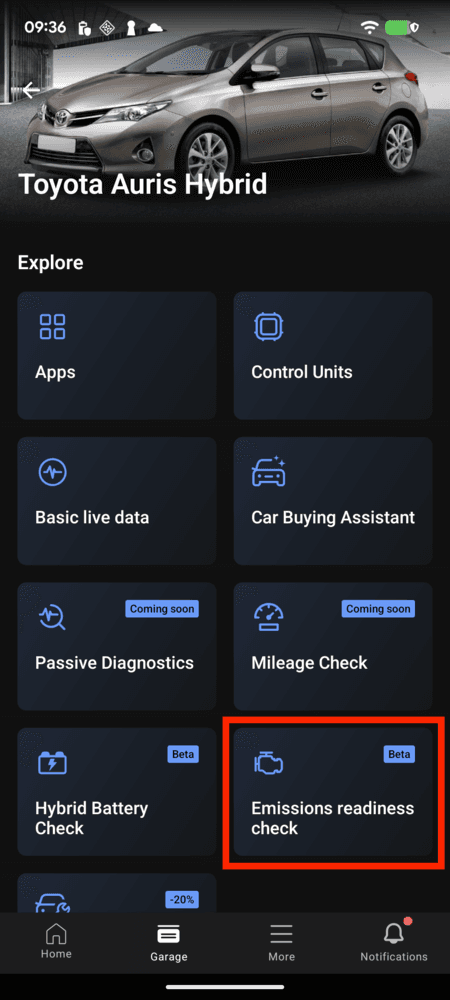
- Emissions readiness check lets you quickly confirm whether all emissions monitors are working properly and whether your car is ready for inspection (available for all licensed brands except EVs).


- Mileage check helps detect irregularities that may indicate odometer tampering in Volkswagen Group vehicles and BMW F Series/G Series models. It compares mileage data across multiple control units and highlights any readings that don’t match.
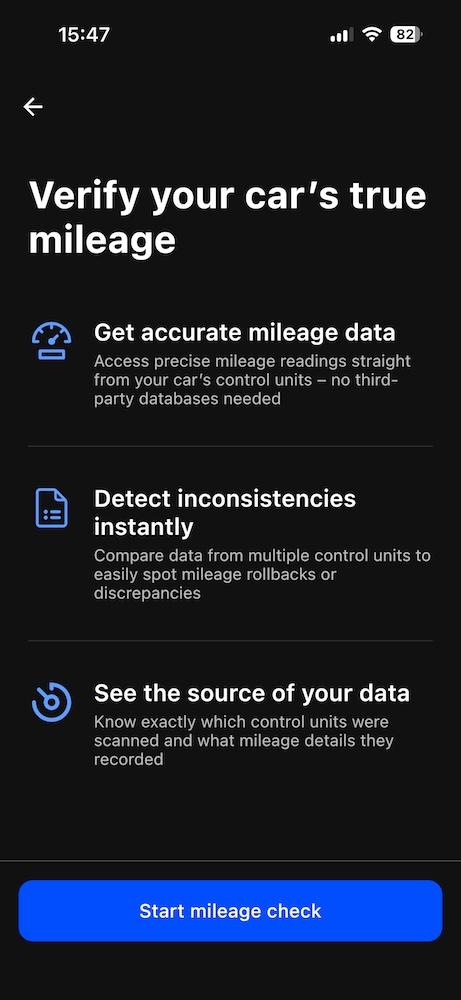
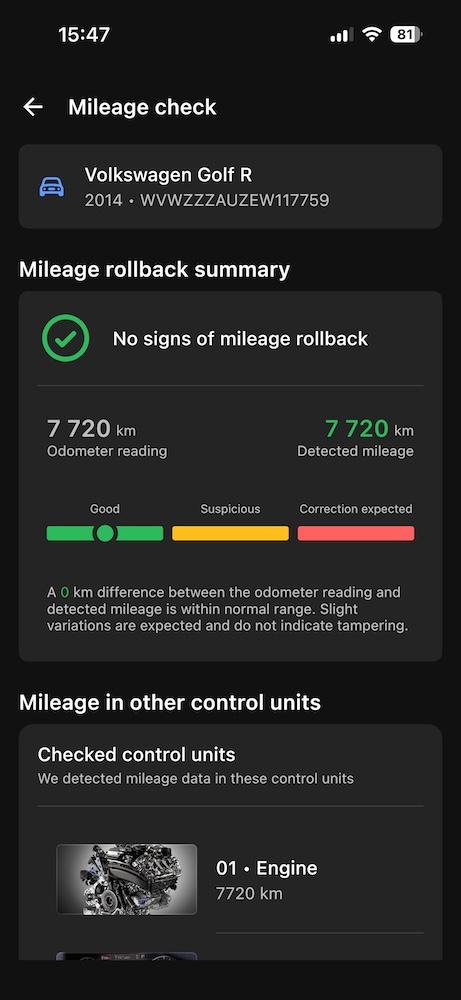
On top of that, OBDeleven offers a range of handy extra features for drivers, such as the Car inspection, Car alerts, Trip tracker, Maintenance reminders, and CarPlay/Android Auto compatibility.
Carista, on the other hand, doesn’t provide the same kind of additional in-app tools. While some of these functions can be replicated manually, OBDeleven has a clear advantage: it’s more user-friendly, concise, and ready to use in just one click.
Pricing: OBDeleven vs. Carista
Both OBDeleven and Carista offer different pricing models to suit varying customer needs.
OBDeleven pricing:
- OBDeleven 3 Device: €84.99
- Credits for One-Click Apps: Starts at €1.99 for 10 Credits
- PRO subscription: €59.99/year
- ULTIMATE subscription: €189.99/year (includes nearly unlimited One-Click Apps and service tools for free)
- Advanced diagnostics: Included for free
- Live data (VAG): Included for free
- ECU information: Included for free
- Service tools: From 10 Credits
- Advanced coding: Requires PRO or ULTIMATE subscription
- Extra features (Maintenance reminders, Car alerts, Car inspection, Hybrid battery check, AI fault explanations, etc.): Included for free
Carista pricing:
- Carista EVO adapter & OBD2 App Bundle:: $89.00 (€75)
- Carista EVO adapter (no subscription, varies per per region): $48.99-$68.05 (€41.42-€57.46)
- Carista OBD adapter (varies per region): $29.99-$55.00 (€25.36-€46.50)
- 12-month subscription: $59.99 (€50)
- 1-month subscription: $14.99 (€13)
- Customizations: Requires subscription
- Advanced diagnostics: Requires subscription
- Live data: Requires subscription
- ECU information: Requires subscription
- Service tools: Requires subscription
Which is easier to use?
Both OBDeleven and Carista are designed to be user-friendly and accessible to drivers of all skill levels.
OBDeleven offers two mobile apps – the multi-brand OBDeleven app and the OBDeleven VAG app. The OBDeleven app offers an easy-to-use design tailored for everyday drivers, while the OBDeleven VAG app is deprecated and used by Lifetime PRO plan owners.
Carista, on the other hand, offers a single app for all supported vehicles. Its minimalist design is easy to use, especially for beginners seeking straightforward functionality.
So, which one to go for – OBDeleven or Carista?
The choice between OBDeleven and Carista largely depends on your needs, vehicle make, and what you value most in a diagnostic tool.
Choose OBDeleven if:
- You own a vehicle from the Volkswagen, BMW, Toyota Groups, Ford (US models), or Mercedes-Benz vehicles, and want deep, manufacturer-backed diagnostics
- You value official licensing and the assurance that comes with features tested to manufacturer standards
- You are interested in advanced coding and adaptations for Volkswagen Group vehicles
- You want to get all the advanced diagnostic features for free
- You want to pay only for the customizations you actually use, without buying a subscription
Choose Carista if:
- You own a broader range of car brands, including Ford, Infiniti, Land Rover, Lincoln, Nissan, Scion, and need a tool with wide brand coverage
- You need a diagnostic app that can work with third-party OBD2 adapters
- A 1-month subscription is a desirable option for you
To sum up
The choice between OBDeleven and Carista depends on the vehicles you want to work on and the features you want.
OBDeleven stands out with in-depth diagnostics at no extra cost or subscription. It also offers advanced coding for Volkswagen Group vehicles, along with a wide range of One-Click Apps for VAG, BMW, Toyota, Ford (US), and Mercedes-Benz cars.
Carista, with its simple design and broad compatibility, is the perfect tool for beginners. It provides easy-to-use diagnostic and customization features without the complexity of manual coding. Both tools are effective, so your decision depends on your specific needs and vehicle preferences.
Disclaimer: This comparison aims to provide an unbiased overview of both products based on available information. Always refer to the official OBDeleven and Carista websites or contact their customer support for the most current and detailed information.
Advice, how-to guides, and car care tips on our blog are intended as helpful resources for general maintenance and repairs. While we strive for accuracy, the information is provided to the best of our knowledge and should be used at your own discretion and risk.
Always refer to your vehicle’s owner’s manual or consult a certified mechanic for specific repair details and safety procedures.


OBDeleven 3 device + 200 Credits
Includes OBDeleven 3 device and 200 Credits for unlocking car features with One-Click Apps
€114.99
No paid plan required