#Buying a car



Introducing Car inspection: Your must-have for smarter car purchases


Buying a used car often feels like a high-stakes gamble. Are there hidden issues? Is the price really worth it? What if you miss something important, and it ends up costing you a fortune?
As car enthusiasts, we’ve been through this second-guessing one too many times. That’s why we built Car inspection (previously known as Car buying assistant) – a feature in the OBDeleven app designed to take the pressure off your shoulders and help you:
- Spot potential problems early
- Inspect every detail – from exterior to under the hood
- Store findings about multiple cars in one place
- And, of course, spend your money wisely and avoid huge costs later on
Why you need car inspection
Combine pushy sellers and limited time to inspect, and you’ve got a recipe for an oversight that’ll naturally cost you later.
Our Car inspection toolkit helps you avoid that and more:
1. Spot issues before they surprise you
Not every problem is obvious. Hidden issues like odometer rollbacks or model-specific weaknesses – like failing direct-shift (DSG) clutches in some Volkswagen Group cars – can easily go unnoticed if you don’t know what to look for.
Can inspection highlights potential red flags using AI-powered Vehicle Lookup, a Manual inspection checklist, or an Automatic scan – helping you save money and avoid bad decisions.
2. Stay organized in high-stress situations
It’s easy to lose track when you’re viewing multiple cars – was it this one with the suspicious rattle, or the one with mismatched panels?
With the Car inspection, you’ll never miss a detail. Results from both the Manual inspection and Automatic scan are saved in one place, making it easier to compare your options.
3. Ask the right questions with confidence
Pushy sellers often rely on buyers being unprepared, but with VIN lookup, you can show up informed. Knowing the expected mileage for a car’s year and make, or spotting recurring issues with certain models, you’ll ask questions where vague answers simply won’t go.
For example: “I noticed this car has higher mileage than average for its year – has the timing belt been replaced?” or “These cars are known for oil leaks. Have you addressed that issue before?”
Don’t forget – there’s an even more accurate way to check what’s going on with your vehicle via Car inspection: Car health report. Run an Automatic scan in just minutes to analyze key systems and receive a detailed summary of detected faults, emissions readiness status, mileage readings, and more (depending on your vehicle).
Armed with these insights, you can confidently question any detected issues and use them to negotiate a better price.
4. Adapt to your inspection time
Car inspection adapts to your needs — an Automatic scan and VIN lookup take just a few minutes, while the Manual inspection can be tailored to be as detailed as you require:
- Short on time? A quick 5-minute checklist focuses on critical red flags like scratches, fluid leaks, or engine noises.
- Have more time? Dive deeper with additional checks for paint flaws, brake responsiveness, and suspension health.
5. Make decisions without regrets
Every checklist and report is saved in the app, so you can revisit it at any time. Consult with a mechanic, share findings with a friend, or review cars side by side – your reports are always at your fingertips.
Now, how does it all come together in the app? Let’s break it down step by step.
How Car inspection works
The Car inspection currently has three key features – Vehicle lookup, Manual inspection checklist, and Automatic inspection (with Car health report). Here’s how each of them work:
AI-powered Vehicle Lookup
Before you even see the car in person, use the Vehicle lookup tool for an AI-powered overview of expected mileage and common issues that could arise based on the car’s details.
In the OBDeleven app, click on the “Garage” at the bottom menu. From here, go to “Car inspection” > “Vehicle lookup.”

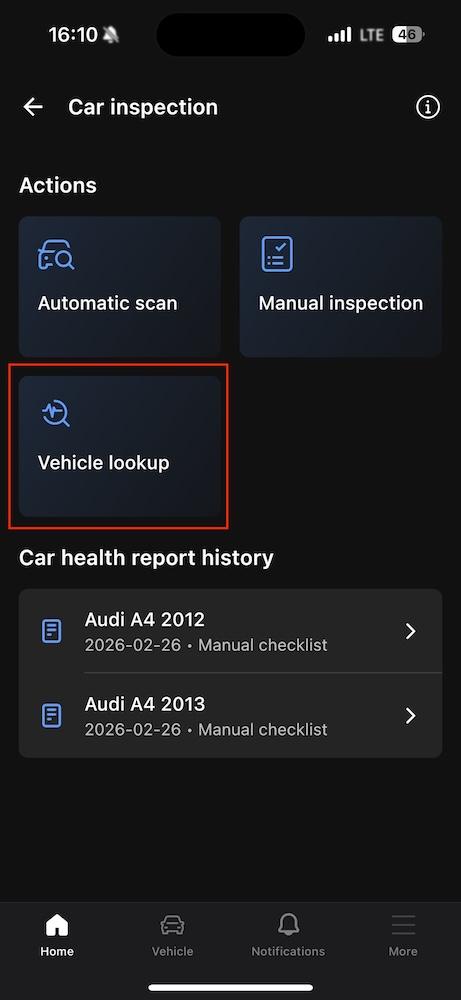
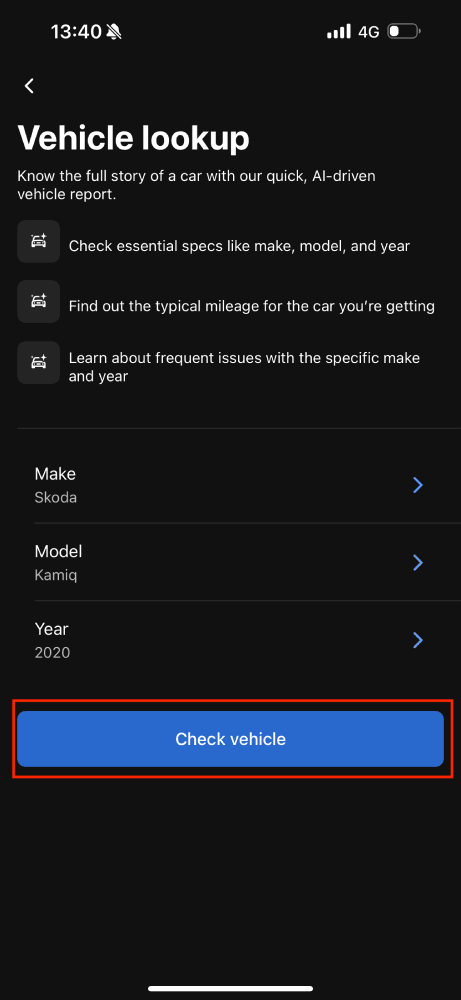
Enter the car’s make, model, and year. Press “Check vehicle.”

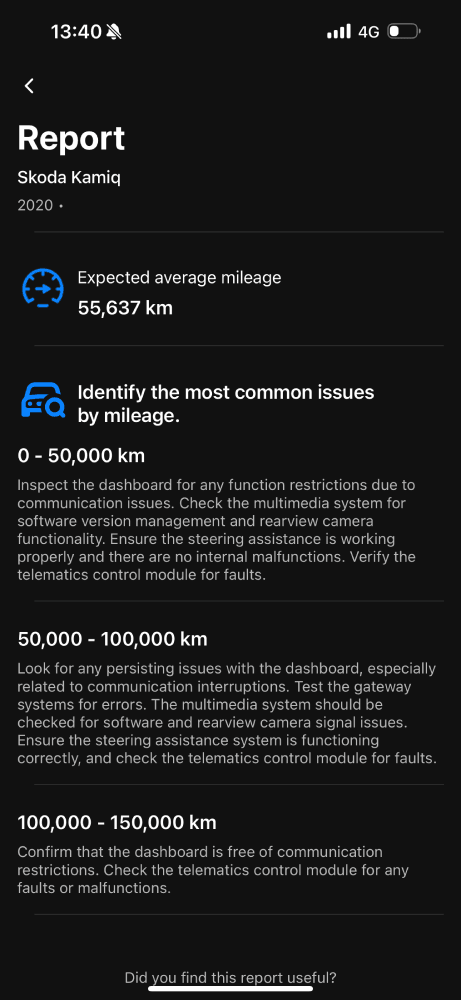
In up to a few seconds, you’ll get a report highlighting typical mileage and common issues for that vehicle type by mileage, plus recommendations on what exactly to check to clarify about those potential issues.
Note: This feature is available even without an OBDeleven device.
Manual inspection
When you arrive to inspect a car, it’s time to have your Manual inspection checklist in hand so that you can inspect everything step by step.
Again, in the OBDeleven app, click on the “Garage” at the bottom menu. From here, go to “Car inspection” > “Manual inspection.”
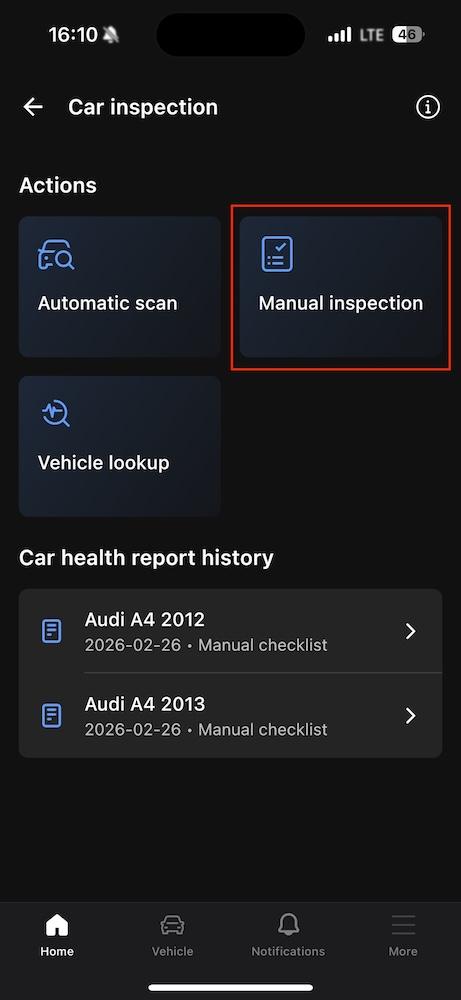
Enter make, model, and year of the car you’re inspecting. Click “Next.”
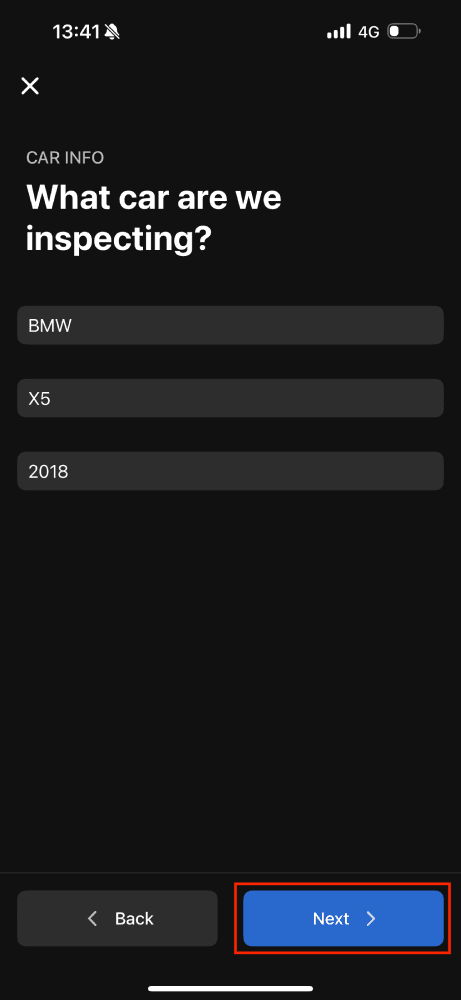
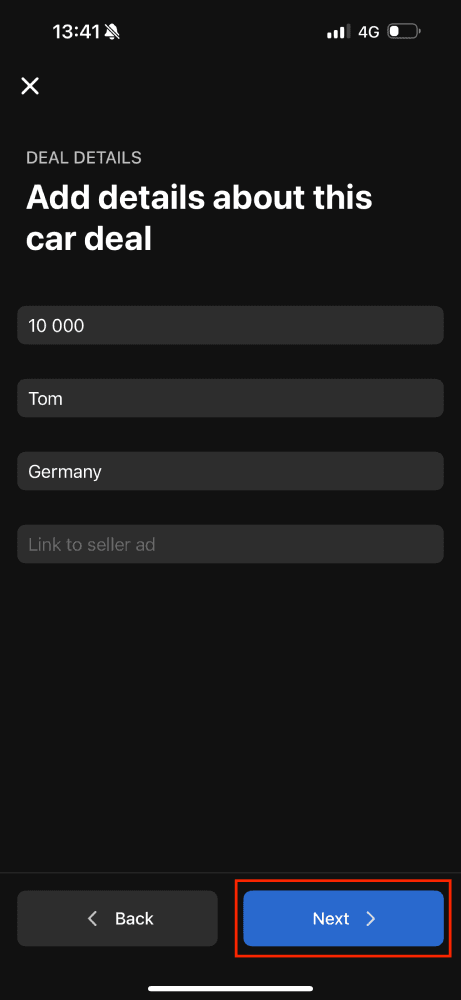
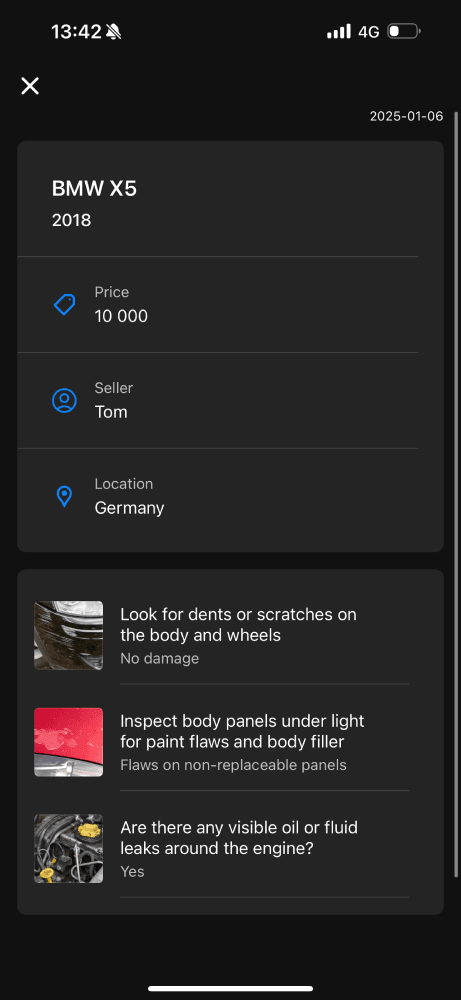
Then, add details about the car deal, like price, location, and seller info.
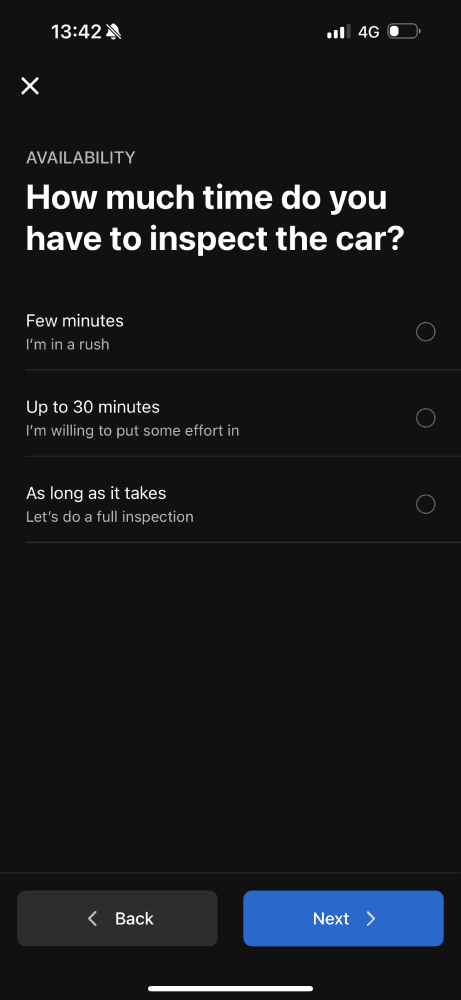
Choose how much time you have for the inspection (short, medium, or in-depth).
Then, follow step-by-step instructions and mark answers about:
- Exterior: Dents, scratches, and paint flaws
- Interior: Mold, moisture, and essential function checks
- Engine: Fluid levels, leaks, and noises
- Test drive: Brake performance, unusual noises, and handling
Here are some examples of what these questions look like:
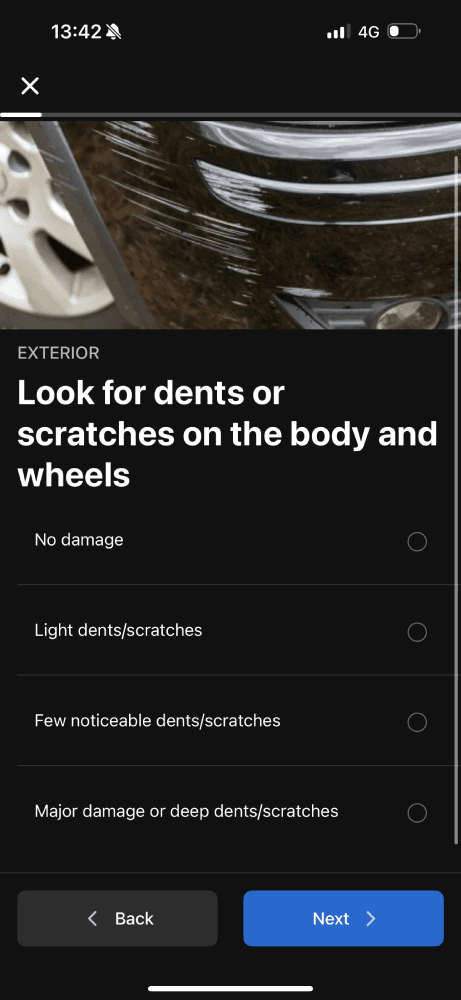


The more time you choose you have, the more detailed the checklist.
When you’re done, click on “View summary” to see the summary of your questionnaire.

Saved checklists
Your inspections don’t end when you walk away from the car. Saved reports make it easy to revisit your findings, compare cars, and share details with others.
All your summaries are saved automatically, and you can review them later from the history section.
Automatic scan and Car health report
Even the most detailed checklist has its limits. While it helps you spot scratches, leaks, and unusual engine sounds, OBDeleven’s diagnostics take it further – showing hidden problems that aren’t visible to the eye (or ear).
You can do diagnostics with your OBDeleven device anytime, but Car inspection’s Automatic scan is designed specifically for buying and selling vehicles. The scan also gives you a handy digital report you can keep for reference or even share with potential buyers.
1. Find issues the seller might not mention
Not all problems show up on the surface. A diagnostic scan can reveal things like:
- Engine trouble (misfires, failing sensors)
- Safety concerns (airbag warnings or brake system faults)
- Electrical glitches (battery or ECU issues)
2. Double-check the “no problems” claim
Sellers often say, “No issues, runs perfectly.” With diagnostics, you don’t have to take their word for it. Plug in OBDeleven, scan the car, and see for yourself. If there’s something wrong, you’ll know immediately.
3. Use diagnostics as a negotiation tool
Found a fault during the scan? That’s leverage. Here’s how diagnostics can save you money:
- Airbag fault? “That’ll cost me $200 to fix – can you lower the price?”
- Engine misfire? “Looks like this might need a repair. What’s your best offer?”
Diagnostics give you the facts to negotiate confidently.
4. Know exactly what you’re buying into
Some faults are acceptable – if you know about them upfront. Diagnostics let you plan for future repairs instead of being caught off guard. Whether it’s a faulty sensor or a small leak, you’ll know what to expect and budget for.
How to an automatic scan with car inspection
- Plug OBDeleven into the car’s OBD2 port
- Open the OBDeleven app and connect your vehicle
- Click on “Car inspection” tile
- Choose “Automatic scan” and follow in-app instructions
- Review the results – see faulty control units and exact trouble codes
- (Optional) Generate a Car health report to share the results via a link or as a PDF
Start your smarter car-buying journey today
Don’t let car buying stress ruin your experience. With the OBDeleven's Car inspection toolkit, you’ll have all the tools you need to make a confident decision – from AI insights to step-by-step inspections and diagnostics.
Download the OBDeleven app and try it for your next used car search.

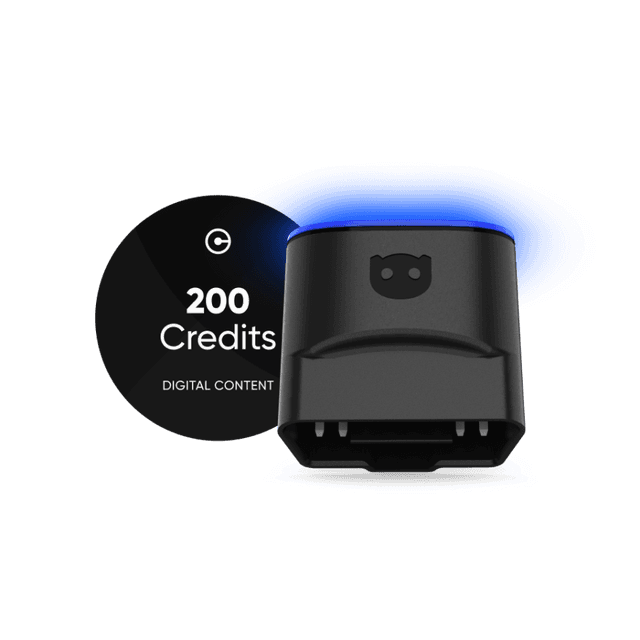
OBDeleven 3 device + 200 Credits
Includes OBDeleven 3 device and 200 Credits for unlocking car features with One-Click Apps
€114.99€91.99
20% OFF
Exclusive deal