#Tools & plans
OBDeleven has two mobile apps available for different car brands.
OBDeleven VAG app is designed for Volkswagen Group (VAG) vehicles exclusively. Advanced features that are available with the PRO and ULTIMATE plans, such as manual coding, are accessible through this app, too.
OBDeleven app supports advanced diagnostics for Volkswagen Group, BMW Group, Toyota Group, and Ford (US models only) vehicles. For basic OBD2 diagnostics, it’s compatible with all other car brands supporting the CAN-bus protocol (manufactured from 2008).
All available OBDeleven features depend on your car brand, model, and year. For a quick look up on what’s available for your vehicle, please visit our Supported vehicles section.
Our apps and devices also differ in the features and functionality they support. If you’re looking for a specific feature, you’ll find key information on supported brands and the required plan, device, and app below.
Step 2: Plug your OBDeleven device into your car’s OBD2 port.
Step 3: Connect it to your smartphone through Bluetooth. Enjoy!
OBDeleven explained: Complete buying guide 2026


TL;DR: For those looking for the most future-proof advanced OBD tool with the widest range of supported brands, OBDeleven 3 is a top choice. If you’re looking for manual coding and SFD unlock for VAG vehicles, consider getting a PRO or ULTIMATE Pack. ULTIMATE is the best choice if you’d like to use lots of One-Click Apps with all the advanced features included.
If you’re on a hunt for a user-friendly car diagnostic tool that wouldn’t mess with your car systems, plus would come packed with extra features like easy customizations (without manual coding!) and vehicle management tools, chances are you’ve heard OBDeleven.
It's a top choice for over 6 million drivers and is one of the safest OBD2 diagnostic tools on the market, officially licensed by leading brands like Volkswagen, BMW, Toyota Groups and US-made Ford. And it has features for drivers of all skill levels – from daily ones without automotive knowledge to real car enthusiasts and even workshops.
Now, the question is, which OBDeleven device is best for your car model, what are different subscriptions and bundles for, and how to access features YOU actually need?
Let us simplify it all and help you choose the best option to improve your car maintenance routine.
OBDeleven 3 vs. OBDeleven 2 (NextGen)
OBDeleven 3 is our newest OBD device, introduced in 2025. It’s faster, more battery-efficient, and more future-proof than its predecessors – OBDeleven 2 (NextGen) and OBDeleven FirstGen**.
OBDeleven 3 supports basic OBD diagnostics for all CAN-bus vehicles manufactured from 2008 onwards. It also enables advanced diagnostics and One-Click Apps for Volkswagen Group (VAG), BMW Group, Toyota Group, and US-manufactured Ford vehicles, for which we hold official licenses.
OBDeleven 2 (NextGen) remains a powerful tool and includes most of the features available on OBDeleven 3. However, it is slower and does not support Ford. You can find a full side-by-side comparison of all our three devices in the table below:

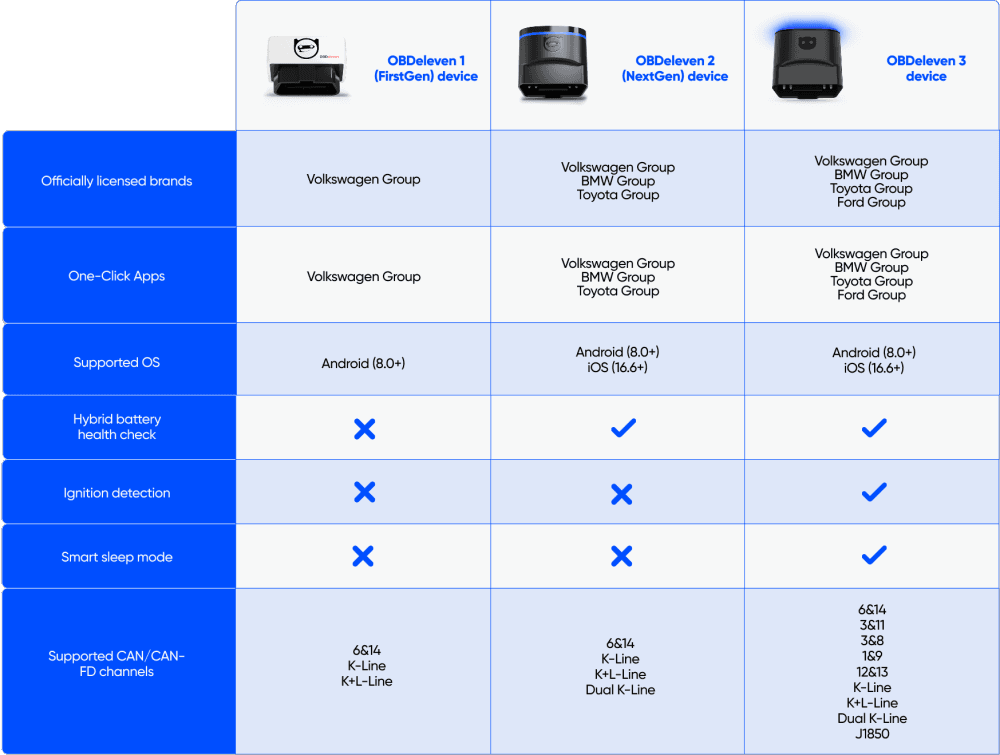
Both devices work with the OBDeleven and OBDeleven VAG apps and are compatible with iOS and Android.
OBDeleven 2 (NextGen) will remain available until stock runs out. If you already own one or decide to purchase it, you’ll continue to receive full support, app updates, and feature updates. That said, all new and upcoming features will be developed primarily for OBDeleven 3.
*The OBDeleven 2 (NextGen) now can be purchased only as part of ULTIMATE bundles due to limited supply. Available only while the stock lasts.
**The FirstGen device is out of stock, and we aren't selling it anymore.
Mobile apps: OBDeleven vs. OBDeleven VAG
OBDeleven has two mobile apps available for different car brands.
OBDeleven VAG app is designed for Volkswagen Group (VAG) vehicles exclusively. Advanced features that are available with the PRO and ULTIMATE plans, such as manual coding, are accessible through this app, too.
OBDeleven app supports advanced diagnostics for Volkswagen Group, BMW Group, Toyota Group, and Ford (US models only) vehicles. For basic OBD2 diagnostics, it’s compatible with all other car brands supporting the CAN-bus protocol (manufactured from 2008).
Note: All features from the OBDeleven VAG app are currently being migrated into one OBDeleven app to provide a more seamless experience in the future.
Key OBDeleven features
All available OBDeleven features depend on your car brand, model, and year. For a quick look up on what’s available for your vehicle, please visit our Supported vehicles section.
Our apps and devices also differ in the features and functionality they support. If you’re looking for a specific feature, you’ll find key information on supported brands and the required plan, device, and app below.
Basic OBD2 diagnostics
- Car brands: All car brands with CAN-bus protocol, from 2008
- Plan needed: FREE
- App needed: OBDeleven
- Device needed: OBDeleven 3 or OBDeleven 2 (NextGen)
Basic OBDeleven OBD2 diagnostics are your go-to for quick and accurate engine and automatic transmission check-ups.
With just a couple of taps, you can scan your engine and get a list of trouble codes for identifying critical problems. It’s also handy for clearing minor faults and perfect for routine inspections – minimal effort for peace of mind on the road.
Advanced diagnostics
- Car brands: Volkswagen Group (VAG), BMW Group, Toyota Group, and Ford (US models only) vehicles
- Plan needed: FREE
- App needed: OBDeleven for Volkswagen, BMW, Toyota, and Ford (US-manufactured) Group vehicles. OBDeleven VAG supports only VAG vehicles (with FirstGen device on Android).
- Device needed: OBDeleven 3 and OBDeleven 2 (NextGen) for Volkswagen, BMW, and Toyota. FirstGen only works with VAG vehicles on Android, while OBDeleven 3 is the only one that supports Ford (US models only)
With this feature, you get a complete health check for your car, similar to having a professional mechanic’s insight. Advanced diagnostics allows you to quickly scan all control units, diagnose, clear, and share fault codes.
Plus, it offers live data for real-time vehicle monitoring. Values include:
- Calculated engine load
- Engine coolant temperature
- Intake Manifold Absolute Pressure (MAP) sensor
- Engine speed (RPM)
- Mass Air Flow (MAF) sensor
You can learn how to read OBD live data in our step-by-step guide.
One-Click Apps
- Car brands: Volkswagen Group (VAG), BMW Group, Toyota Group, and Ford Group (US models only)
- Plan needed: FREE, just buy some Credits (our in-app currency) to activate. Nearly unlimited One-Click Apps without any extra Credits are also available with the ULTIMATE plan
- App needed: OBDeleven – for VAG, BMW Group, Toyota Group, Ford (US-manufactured only) vehicles. OBDeleven VAG app supports One-Click Apps for Volkswagen Group only
- Device needed: OBDeleven 3 and OBDeleven 2 (NextGen) for Volkswagen, BMW, and Toyota. FirstGen only works with VAG vehicles on Android, while OBDeleven 3 is the only one that supports Ford Group (US models only)
Our One-Click Apps offer a straightforward way to customize your car’s features. These ready-to-use applications let you activate, deactivate, and adjust your car's functions quickly and effortlessly.
With One-Click Apps, you can integrate retrofitted parts like parking sensors, LED license plate lights or taillights, reset service lights, activate video in motion or needle sweep gauge test, play around with Urban Joke, Scandinavian DRLs, and much more.
It's a practical and efficient toolbox for personalizing your car to suit your preferences and needs.
Note: Different One-Click Apps are available for different brands. Check out our customizations list to find what’s possible for your car.
Manual VAG coding & adaptations
- Car brands: Volkswagen Group (VAG) vehicles
- Plan needed: PRO or ULTIMATE
- App needed: OBDeleven VAG
- Device needed: OBDeleven 3, 2 (NextGen), or FirstGen for Android only
For the more experienced car enthusiasts and workshops, our professional features take diagnostics and customization further.
You can engage in detailed coding and adaptations, fine-tuning your car’s systems on a workshop-grade level. These features provide the control and sophistication of professional equipment but in a more accessible and user-friendly smartphone app format.
Read more about these features here:
Mileage check
- Car brands: Volkswagen Group and BMW F Series and G Series cars
- Plan needed: FREE
- App needed: OBDeleven
- Device needed: OBDeleven 3 or OBDeleven 2 (NextGen)
Mileage check is a handy feature when buying or selling a vehicle. It reads odometer data from various control units and compares the values to detect signs of mileage rollback.
The app then presents a clear result showing whether your car’s mileage appears genuine or has possibly been corrected.
Maintenance reminders
- Car brands: All supported brands (with CAN-bus, 2008+)
- Plan needed: FREE
- App needed: OBDeleven
- Device needed: OBDeleven 3 or OBDeleven 2 (NextGen)
Maintenance reminders help you keep track of essential vehicle services, ensuring you don’t miss oil changes, filter replacements, or even insurance and license renewals.
You can select from standard service options or create custom car-related notifications, keeping everything organized in one place, right in the app.
Emissions readiness check
- Car brands: VAG, BMW, Toyota/Lexus, US-made Ford (not available on EVs)
- Plan needed: FREE
- App needed: OBDeleven
- Device needed: OBDeleven 3 or OBDeleven 2 (NextGen)
The Emissions readiness check feature in the OBDeleven app lets you quickly see whether your vehicle is prepared for emissions or technical inspection.
It reads data from the car’s control units to confirm that essential emission-related systems are operating properly. Especially useful in countries where this procedure is mandatory to pass the vehicle's inspection.
Car buying assistant
- Car brands: All supported brands (with CAN-bus, 2008+)
- Plan needed: FREE
- App needed: OBDeleven
- Device needed: None
The Car buying assistant helps you make more informed decisions when purchasing a used vehicle.
It guides you through key checks, helping identify potential issues before you buy, so you can avoid unexpected problems and buy with greater confidence.
This feature is available even without an OBDeleven device, so you can download the app and try it out today for free.
Hybrid battery check
- Car brands: Toyota and Lexus
- Plan needed: FREE
- App needed: OBDeleven
- Device needed: OBDeleven 3 or OBDeleven 2 (NextGen)
Hybrid battery check assesses your hybrid battery using two key indicators – battery balance and battery temperature – and provides a clear final status: healthy or unhealthy. This helps identify risks early, reducing the chance of overheating and premature degradation.
Vehicle information
- Car brands: Volkswagen Group (VAG), BMW Group, Toyota and Ford Group (US models only) vehicles, plus all other car brands with CAN-bus protocol, from 2008
- Plan needed: FREE
- App needed: OBDeleven VAG for VAG vehicles, OBDeleven – for all other brands
- Device needed: OBDeleven 3 and OBDeleven 2 (NextGen) for Volkswagen, BMW, and Toyota. FirstGen only works with VAG vehicles on Android, while OBDeleven 3 is the only one that supports Ford (US-manufactured only).
OBDeleven gives you quick access to vital VIN data, like car’s mileage, engine code, body type, and manufacturing year. The exact values vary depending on your car.
For Volkswagen Group, BMW Group, and Toyota Group vehicles you can get even more specific details about the car parts and options added during factory production, such as the engine, gearbox, and battery.
Virtual garage
- Car brands: Volkswagen Group (VAG), BMW Group, Toyota Group and Ford (US-manufactured only) vehicles, plus all other car brands with CAN-bus protocol, from 2008
- Plan needed: FREE
- App needed: OBDeleven for all supported brands, OBDeleven VAG for VAG vehicles
- Device needed: OBDeleven 3 and OBDeleven 2 (NextGen) for Volkswagen, BMW, and Toyota. FirstGen only works with VAG vehicles on Android, while OBDeleven 3 is the only one that supports Ford Group (US models only)
Garage is like a centralized hub for all your connected vehicles. Here, you can easily sort and organize them by name, model year, or connection date.
This feature provides a detailed overview of each car – including customizable names and pictures, modification history, and available One-Click Apps.
Also, you can view control unit data, fault codes, and the history of each car, if supported.
Vehicle history
- Car brands: Volkswagen Group (VAG), BMW Group, Toyota Group, and Ford (US-manufactured only)
-
Plan needed: FREE – basic vehicle history for all supported brands; PRO/ULTIMATE (for VAG only) – history of past manual coding and adaptationsApp needed: OBDeleven VAG for Volkswagen Group vehicles, OBDeleven for all brands
- Device needed: OBDeleven 3 and OBDeleven 2 (NextGen) for Volkswagen, BMW, and Toyota Groups . FirstGen only works with VAG vehicles on Android, while OBDeleven 3 is the only one that supports Ford Group (US models)
The Vehicle history feature provides a clear and detailed record of your vehicle’s past activities, such as scans, cleared faults and activated One-Click Apps.
For Volkswagen Group vehicles, you can see even more with the PRO or ULTIMATE plans. Overview all the changes made to control units, capturing everything from coding adjustments to adaptations.
Plus, this feature includes a comprehensive view of diagnostic and backup sessions for your VAG vehicle or chosen control module. This way, you can track and share your car’s diagnostic history with fellow enthusiasts or mechanics – which is particularly helpful if you want to quickly identify issues.
OBDeleven plans
OBDeleven has three subscription plans – FREE, PRO, and ULTIMATE. Each is created to cater to different driver needs, experience level, and comfort.
What can you do with the FREE plan?
The FREE Plan comes by default with every device. It allows to scan available vehicle control units, read and clear faults, as well as check vehicle information. It's a perfect choice for daily drivers who want to enjoy easy on-the-go diagnostics and spot issues early.
OBDeleven PRO vs. ULTIMATE plan
The PRO and ULTIMATE plans offer advanced features for more experienced auto enthusiasts and Volkswagen Group (VAG) professionals. As an officially licensed third-party tool, OBDeleven lets users access SFD-locked features and modify their vehicles to the fullest. These subscriptions include extensive coding and adaptation capabilities.
PRO plan features for only Volkswagen Group vehicles include:
- SFD Unlock
- Coding & Long Coding
- Adaptations & Long Adaptations
- Basic Settings
- Trouble Code Freeze Frame
- Gateway Coding
The ULTIMATE plan comes with all PRO features, plus:
- Unlimited* One-Click Apps – so you don’t need to buy any extra Credits to use them as much as you wish
- OCAbuilder – so you can even develop your own One-Click Apps for VAG vehicles
- RAW data – that's needed to use the OCAbuilder (VAG-only)
All PRO and ULTIMATE users also receive priority customer support.
You can buy each subscription plan separately or choose a more convenient way to get an all-in-one bundle – the OBDeleven 3 device packed with your selected plan in our PRO Pack or ULTIMATE Pack.
*Fair use policy applies. More info here.
*Fair use policy applies. More info here.
How to use OBDeleven?
After your OBDeleven arrives at your doorstep, follow these quick steps:
Step 1: Download the OBDeleven or OBDeleven VAG mobile app and create your account.
Step 1: Download the OBDeleven or OBDeleven VAG mobile app and create your account.
Step 2: Plug your OBDeleven device into your car’s OBD2 port.
Step 3: Connect it to your smartphone through Bluetooth. Enjoy!
We've also covered all you need to know to get started with OBDeleven in our comprehensive FAQ.
Note: In some 2020 and newer models, you may need to partially open the hood to disable the diagnostic firewall to run diagnostics and activate One-Click Apps. To do this, pull the hood release handle typically found under the steering wheel or near the driver's side door.
Summing up
We hope this buying guide has helped you understand which device, app, and plan is needed to get the specific features for your car model. Now, it’s time to enjoy them all!
If there’s something else you’d like to clarify before clicking that “Buy” button – visit our Support section to find answers to all your questions.
Also, check out this video below to see how to get started with OBDeleven once it arrives at your doorstep:


OBDeleven 3 ULTIMATE Pack
Includes OBDeleven 3 device, ULTIMATE plan (12-month), magnetic phone holder, and carry pouch
€259.99
Free shipping