#Coding & customizations
Getting started with One-Click Apps: A to Z


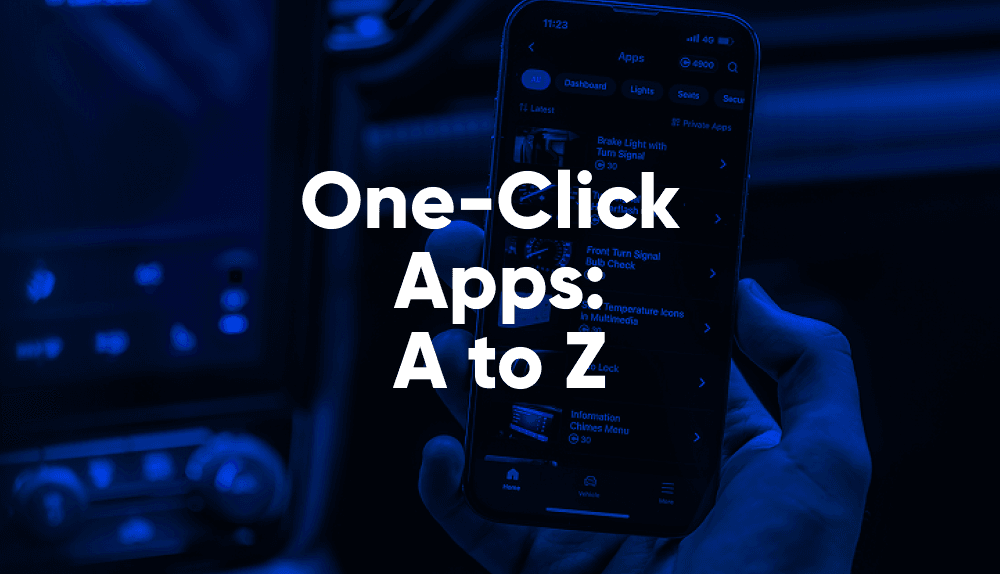
Can changing how your car’s control units behave be as easy as a few taps? That’s exactly what One-Click Apps do.
They’re a growing collection of pre-made coding shortcuts for your car. Built and tested by OBDeleven engineers, these functions let you safely customize comfort, security, and even hidden manufacturer settings – no coding experience required.
In this beginner guide, we’ll explain:
- What are One-Click Apps and how they work
- What are the most popular ones
- How to use One-Click Apps & what you can do with them
- How much they cost & how to get Credits for free
- How they differ from manual coding
- How to make sure they’re activated smoothly
What are One-Click Apps?
One-Click Apps are pre-programmed coding sequences for Volkswagen, BMW, Toyota, Ford (US-only), and Mercedes-Benz Group vehicles. You can run them using one of OBDeleven devices, which is officially licensed by these brands for extra safety.
It takes just a few taps on the mobile app – and you’re activating, deactivating, and changing various vehicle features.
Each One-Click App applies verified settings directly to your car’s control units – no need to dig through coding values yourself. Because everything's been pre-tested, you get dealership-level results with none of the guesswork.
In practice, One-Click Apps let you do adjustments such as:
- Make your fog lights and high beams turn on together
- Disable the Start/Stop system
- Have your car lock itself automatically
These are just a few examples – there are tons of options to choose from for different vehicles. Check them in our customizations page.
What are the most popular One-Click Apps?
Here are some of the most popular One-Click Apps among our community, by brand/series:
VAG (Volkswagen / Audi Group)
- Virtual cockpit theme – lets you unlock and switch between available cockpit themes already installed in your vehicle.
- Brake pads replacement – allows professionals to release the electronic parking brake mechanism during service.
- Oil service reset – resets the oil service reminder after maintenance.
BMW F/G series
- Rear brake pads reset – lets technicians reset the rear brake pad interval after replacement.
- Engine oil reset – resets the engine oil interval following an oil change.
- iDrive startup animation – lets you choose your preferred startup animation when turning on the vehicle.
BMW E series
- Vehicle check reset – resets the vehicle check interval after scheduled maintenance.
- 12V battery registration – registers a new 12-volt battery after replacement.
- Front brake pads reset – lets technicians reset the front brake pad interval after replacement.
Toyota / Lexus
- Comfort turn signals – adjusts how many times the comfort turn signals flash.
- Drive monitor camera operation – controls how the driver monitoring system works, including eye tracking and drowsiness alerts.
- Two step door unlock – enables unlocking the car doors in two steps using the remote key.
Ford
- Driver seatbelt reminder chime – controls the seatbelt reminder chime for the driver's seatbelt.
- Multimedia startup logo – changes the startup logo that appears when your multimedia system turns on.
- Dashboard information message chime – controls the sound for informational messages on the dashboard.
Mercedes-Benz
- Start/stop deactivation – deactivates the system that controls engine shut-off when you stop.
- Multimedia startup logo – changes the startup logo that appears when your multimedia system turns on.
- Comfort turn signals count – increase or decrease the number of indicator flashes.
How to use One-Click Apps?
Now, let's go through the One-Click App activation process step-by-step:
1. Plug in your OBDeleven device to the OBD port.
2. Open the mobile app. Use OBDeleven VAG if you own a FirstGen device, or OBDeleven for OBDeleven 2 (NextGen) and OBDeleven 3 devices.

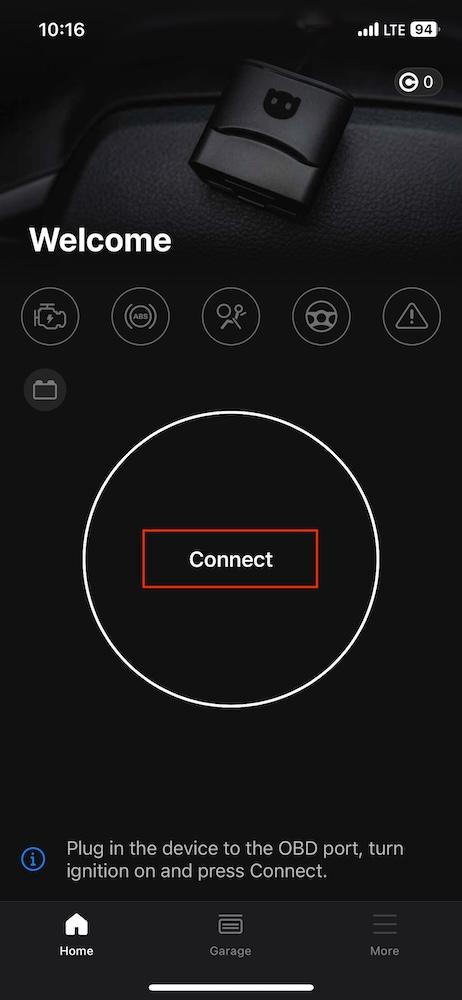
3. Click “Connect” and wait until it does.
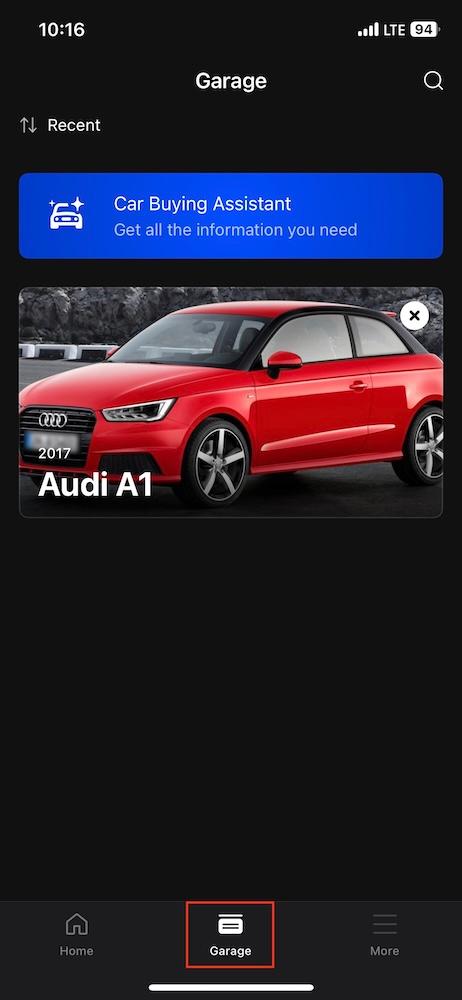
4. Go into the “Garage” category and click on your vehicle.
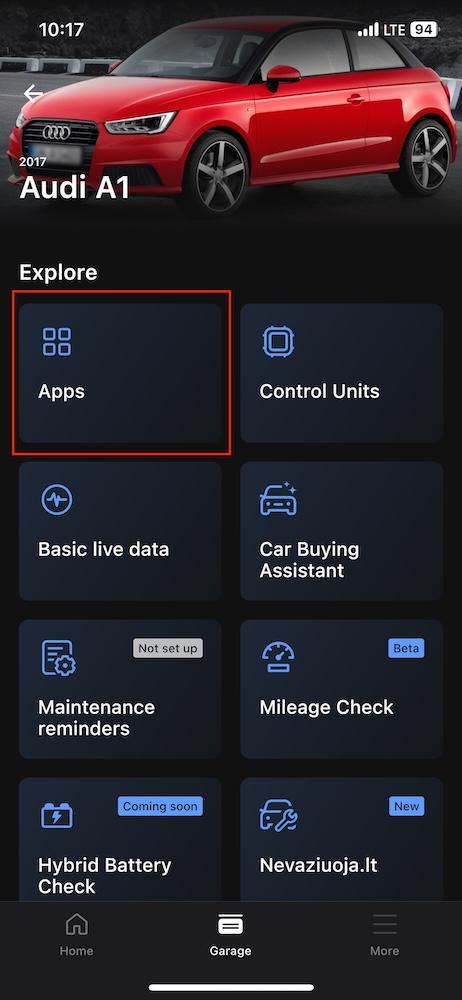
5. Click on “Apps” – here you’ll find a list of all available ones.
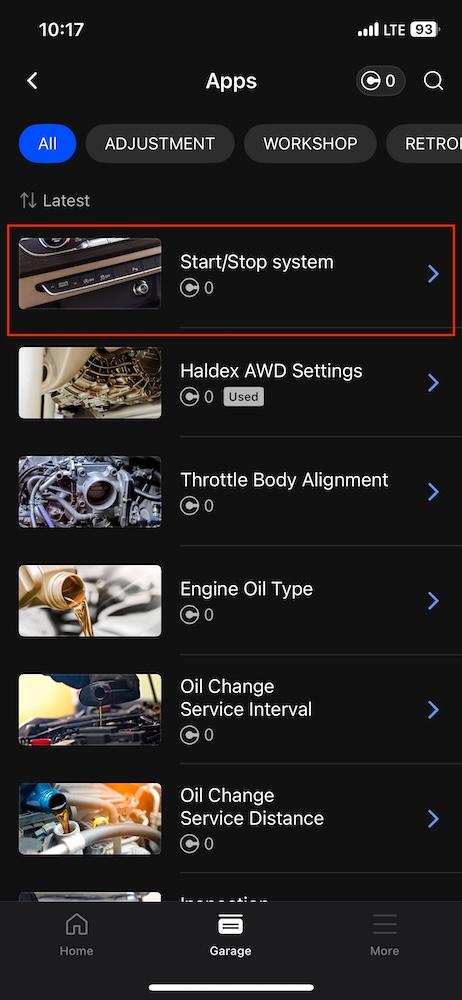
6. Browse available One-Click Apps. You’ll see a full list of compatible ones with descriptions, procedures, and cost in Credits. The cost will appear as zero for those that have the ULTIMATE plan (as seen in the screenshot), while FREE and PRO members will see the amount of needed Credits.
7. Choose and click on the One-Click App you want. Read the description carefully and prepare to follow the instructions given.
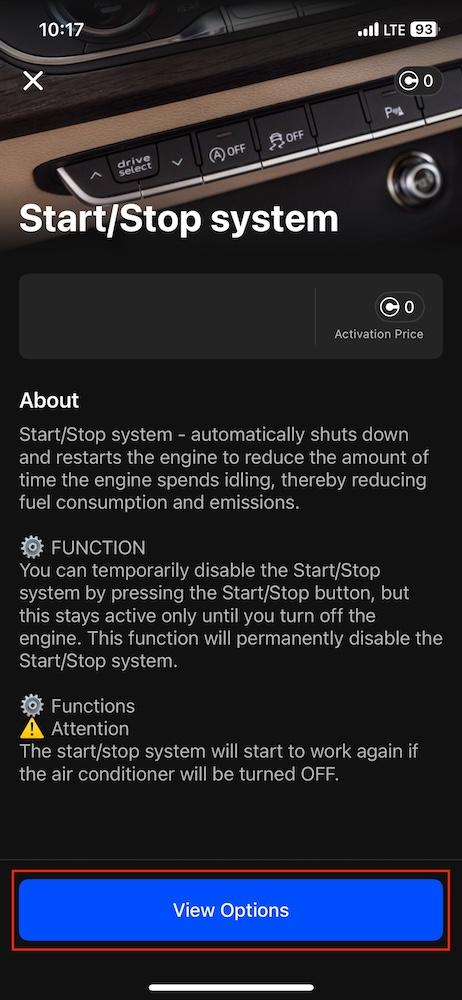
8. Tap “View Options” – you’ll see a list of different values pop up. Choose the one that you want. For some One-Click Apps, it’ll be only On/Off, while for others you’ll see more (such as the level of brightness, or mode type).
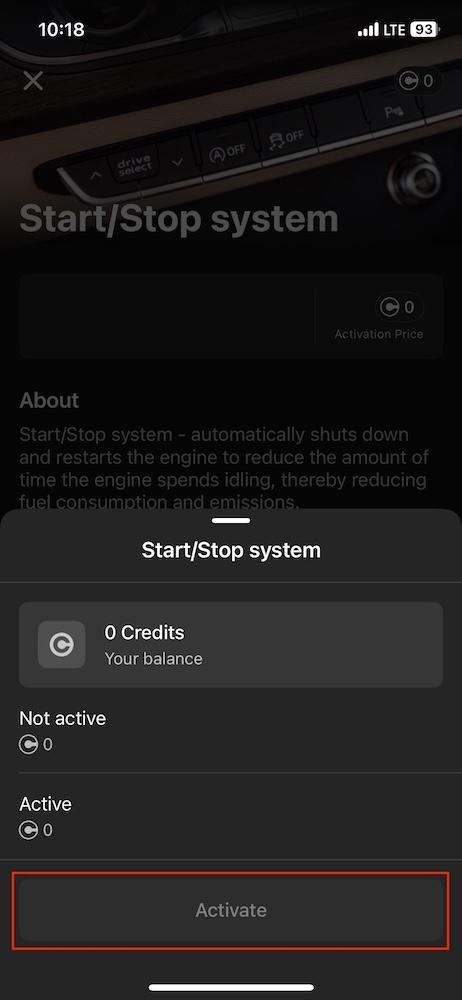
9. Click “Activate” – the One-Click App is now enabled. Credits will be deducted automatically for FREE and PRO plan users.
Note: The FirstGen device works only with Volkswagen Group cars. OBDeleven 2 (NextGen) unlocks BMW and Toyota Groups, while OBDeleven 3 supports all the mentioned licensed brands + Ford (US) and Mercedes-Benz.
What can you do with One-Click Apps?
Exact options and categories depend on your vehicle’s brand, model, year, and equipment. That’s because each car uses different control units and firmware. To check compatibility, visit our customizations page and enter your car’s details.
You’ll find a dedicated One-Click App library for your specific vehicle in the app, sorted by categories like:
- Workshop – all kinds of service functions for professionals or experienced enthusiasts, such as oil or brake pad replacements
- Adjustment – feature activation and correction, like rolling down windows using the keyfob
- Retrofits – activate added equipment
- Lights – adjust DRLs, fogs, indicators
- Dashboard – enable hidden menus or startup animations
- Security – tweak locking or alarm behavior
- Interior – change comfort settings
Don’t see the feature you want? This may not be the end of it. We release new One-Click Apps every month and announce them on our blog and Instagram.
How much do One-Click Apps cost?
Prices for One-Click Apps range between 10 and 100 Credits (from €1.99 to €17.99). Common service functions you’ll use often usually cost around 10 Credits, while rarer or one-time activations cost more.
You can purchase them from the OBDeleven website or via the Google Play Store, App Store, or Huawei AppGallery. We recommend buying from our official website cause third-party stores may include extra fees.
Anyone with an OBDeleven device – whether it’s FirstGen, OBDeleven 2 (NextGen), or OBDeleven 3 – can use One-Click Apps. FREE and PRO plan users will need to purchase Credits to activate. But, if you plan to use One-Click Apps often, it might be worth upgrading to the ULTIMATE plan. For a yearly payment, you’ll get unlimited access to One-Click Apps under fair-use limits.
Don’t have a device yet? We also offer Packs that include complimentary Credits – like ULTIMATE, or a limited offer with OBDeleven 3 + 200 Credits.
What can you do with 100 Credits?
If we take BMW as an example, for the price of 100 Credits (equal to 18 euros) you could:
- Make the car remember your last Start/Stop memory setting
- Change the iDrive startup animation for a more personalized feel
- Enable Side marker lights
- Do a service function like Engine oil reset
And still have some Credits left for one more comfort function like enabling window and sunroof control via the key fob. That’s a whole bunch of functions for the price of a movie ticket and popcorn.
Can One-Click apps help you save money?
Yes. Because one basic function takes just a minute and costs a fraction of a shop visit.
OBDeleven also covers many of the service functions you’d normally pay a mechanic for – all as One-Click Apps, plus free diagnostics for life. So, if you’ve got technical knowledge and experience, it’s a great way to save. Especially when you factor in the time spent driving to and from the workshop and the diagnostic fees that add up, OBDeleven pays for itself fast.
And here’s the best part – there are even ways to get One-Click Apps completely free.
How to get OBDeleven Credits for free?
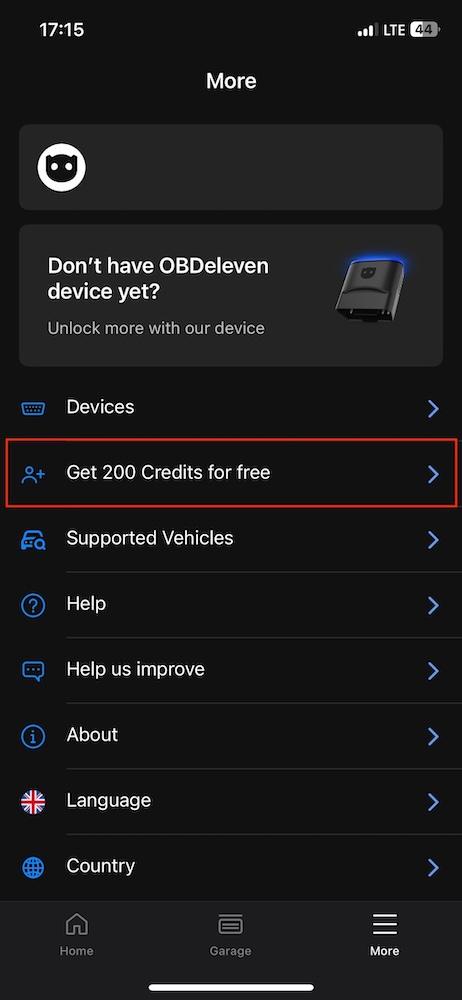
You can get free Credits through our referral program and use them however you wish.
How does it work? For every friend who uses your link to make a qualifying purchase (like the OBDeleven 3 device, OBDeleven 3 PRO, or OBDeleven 3 ULTIMATE Packs), they receive a 10% discount, and you earn 200 Credits.
Check out the full guide right here or visit this section in the app:
Why choose One-Click Apps over manual coding?
| Method | Pros | Cons |
| One-Click Apps |
|
|
| Manual coding |
|
|
The takeaway? If you’re new to car coding, it’s best to start with One-Click Apps.
They’re the easiest, safest way to understand how your car’s software behaves before trying manual coding.
A few things to watch for
One-Click Apps should activate easily. However, please make sure you’ve done the following things before:
- Read the entire One-Click App description. Make sure you’ve read all the information about software, hardware, generation requirements, other warnings and in-car procedures.
- Check if your vehicle has the required equipment. If you encounter a “Not supported” message, the chosen One-Click App may not find the necessary hardware or parts (LED lamps, for example).
- Make sure that the ignition is ON. Without it, the control unit cannot respond, and “Check ignition” or “Not supported” messages can appear in the app.
In some cases, the changes can be slightly delayed and take a short drive to appear. Also, don’t worry if you don’t like the change – you can always revert to the original value (using Credits again).
In case you ever need more specific steps, we also have a FAQ page for further troubleshooting.
Get inspired by the OBDeleven community
One-Click Apps are a favorite among the OBDeleven and general car enthusiast community for quick car customizations.
Want to see how others use them? Join the OBDeleven Forum or one of our Facebook groups to share your own results, discover new One-Click Apps, and connect with fellow modders.


100 Crediti
Aggiungi 100 Crediti al tuo account per attivare diverse One-Click Apps
€17.99