#Tools & plans
What is Ford FJDS?
Vehicle compatibility
Features
Diagnostics
Coding and customization
FJDS, on the other hand, doesn’t focus on pre-made functions in the same way. Instead, you’ll have to do all the manual coding yourself. It’s more suitable for deep-level servicing and control module programming that goes beyond what OBDeleven can do.
Extra features
Licensing
Ease of use
OBDeleven vs. FJDS: Which diagnostic tool is right for you?


TL;DR: Both OBDeleven3 and FJDS are useful Ford diagnostic tools, but they serve different users. FJDS (Ford's official module-programming tool) is better for advanced Ford-specific workshop tasks, while OBDeleven OBD2 scanner offers better value, easier navigation, and a more user-friendly experience for most DIYers.
Whether you’re new to car diagnostics and customization or already knee-deep in Ford DIY projects, the right diagnostic tool can make all the difference.
That’s why here, we’re boiling down two popular aftermarket choices for working with Ford vehicles: the Ford J2534 Diagnostic Software (FJDS), trusted by professional technicians, and OBDeleven 3, a favorite among DIY car enthusiasts.
If you’re a daily driver or hobbyist trying to decide between them, there are important factors to weigh – especially when it comes to cost, complexity, and capabilities. Let’s dive in.
What is OBDeleven 3?
OBDeleven 3 is a slick, pocket-sized Bluetooth OBD2 scanner that plugs into your car’s OBD2 port and pairs with a smartphone app. Perfect for US-made Fords from 2008 onward, it’s built for both beginners and seasoned DIYers. The app offers hassle-free customizations called One-Click Apps and quick, in-depth car checks.

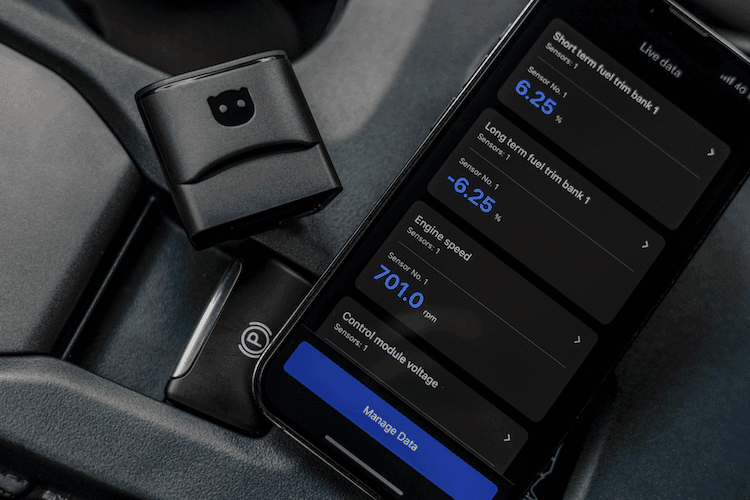
While it can’t match full dealership-grade functions (no programming for Fords available), it’s perfect for on-the-go diagnostics and more affordable than similar tools out there. Plus, it’s officially licensed by Volkswagen (VAG), BMW, Toyota, Ford (US) and Mercedes-Benz.
Here’s a quick breakdown of the main pros and cons of the device:
Here’s a quick breakdown of the main pros and cons of the device:
| Pros | Cons |
|
|
What is Ford FJDS?
FJDS, short for Ford J2534 Diagnostic Software, is Ford’s official module-programming tool. You’ll see this used mainly in workshops for replacing and initializing control modules or other advanced servicing tasks. For this reason, and its steep price tag, it’s more suitable for experienced technicians or seasoned Ford experts.


The FJDS is not a device on its own, but rather PC-based software. To run it, you’ll also need a separate compatible J-2534 device, which is a pass-through programming tool that allows you to connect a Ford vehicle’s engine control unit to a computer.
In workshops, technicians also use FJDS with official Ford diagnostic tools such as VCM, VCM II, and VCMM.
Check out the main benefits and downsides to consider in the table below:
| Pros | Cons |
|
|
What are FJDS alternatives?
FJDS alternatives depend on the type of work you need to do.
For official Ford-level diagnostics and repairs, FDRS is Ford’s newer factory diagnostic software for many 2018 and newer Ford and Lincoln vehicles, while IDS is commonly used for older Ford platforms.
For basic diagnostics, tools like FORScan or a compatible OBD2 scanner like OBDeleven 3can be enough for reading codes, viewing live data, or doing simple customizations. However, for official module programming and advanced dealer-level functions, Ford’s official software options are usually still required.
FJDS vs. OBDeleven quick comparison
If you’d rather skip the deep dive, the table below sums up the essentials, such as vehicle coverage, key features, and pricing for both devices.
| Ford FJDS | OBDeleven 3 | |
| Type/platform | PC software + J2534 adapter | Bluetooth OBD2 dongle + smartphone app |
| Vehicle coverage | Ford, Lincoln, Mercury (programming 1996+; complete diagnostics 2018+) | Ford US models with CAN-bus protocol (~2008+); multi-brand support |
| Key features |
|
|
| Ease of use | Complex, not very beginner-friendly, requires:
|
User-friendly – for every drive:
|
| Pricing |
|
|
| Official licenses | Official manufacturer software, comes directly from Ford | Officially licensed for Ford + other leading manufacturers (Volkswagen, Toyota, BMW Groups and Mercedes-Benz) |
Tip: If you’d like to compare more diagnostic options, our guide to the best OBD2 scanners for Ford can help.
Vehicle compatibility
There are a few important limitations to keep in mind with both devices.
Advanced Ford diagnostics with OBDeleven are currently available only for US-built vehicles. If your Ford was manufactured in another region (for example, the EU), you’ll be limited to engine and transmission diagnostics.
OBDeleven also works only with vehicles that use the CAN-bus protocol – typically Fords made from 2008 onward. If you own an older model, this tool won’t be the right fit.
However, if you own vehicles from different brands, OBDeleven provides officially licensed compatibility with Volkswagen, Toyota, BMW Group, Ford (US) and Mercedes-Benz vehicles, along with basic OBD2 diagnostics for many other popular models.
FJDS, on the other hand, provides full diagnostics only for selected 2018 Ford/Lincoln models and newer. For vehicles built between 1996 and 2017, it’s dedicated solely to module programming tasks.
Pro tip: If you want to run full diagnostics on older Ford models, you’ll need to use Ford’s IDS software instead.
Is FJDS only for Ford?
No, FJDS, or Ford J2534 Diagnostic Software, is not limited only to Ford-branded vehicles.
It also supports Lincoln vehicles and older Mercury models, depending on the model year and available functions.
It is not intended for unrelated brands such as BMW, Toyota, Volkswagen, or others. In practice, it’s mainly used for Ford and Lincoln diagnostics, programming, and service functions, with legacy Mercury support where applicable.
Do you need FJDS for basic diagnostics?
No, FJDS isn’t needed for basic diagnostics like reading or clearing fault codes, viewing live data, or running a general scan.
It’s mainly used for advanced Ford-specific functions, such as dealership-level diagnostics, module reprogramming, and official calibration updates.
Features
Diagnostics
OBDeleven 3 provides a solid foundation to start with on your Ford. It lets you access all vehicle modules for diagnostics, read manufacturer-specific codes, and view OBD2 live data.
FJDS can also run diagnostics and read DTCs, but its strength lies in advanced workshop-level tasks. It provides dealer-grade access to service functions – including the ability to program the PATS system for keys.
Coding and customization
OBDeleven offers simple pre-coded customizations called One-Click Apps. If you want to make just a few tweaks, simply select the function you want in the app, tap it, and you’re done.
These same types of tweaks can also be made using manual coding – however, OBDeleven currently supports manual coding only for Volkswagen Group vehicles, not Ford.
Still, this isn’t a major drawback if you’re only looking for a handful of changes. That’s because many popular functions – such as chimes, lights, and locks – are covered by One-Click Apps, making customization quick, easy, and beginner-friendly.
Tip: You can check which One-Click Apps are available for your car directly in the OBDeleven app once connected to your vehicle or via the online checker before purchase.
FJDS, on the other hand, doesn’t focus on pre-made functions in the same way. Instead, you’ll have to do all the manual coding yourself. It’s more suitable for deep-level servicing and control module programming that goes beyond what OBDeleven can do.
Extra features
OBDeleven:
- Maintenance reminders – a simple way to remember when your oil, filter, or other service is due. You can also add dates like your technical inspection or insurance expiry and relax knowing you’ll get a few reminders before the deadline.
- Car inspection, a digital guide for buying your next vehicle. It lets you look up common issues and ask the right questions. Paired with diagnostics, it’s even more powerful and can help you avoid a lemon or negotiate the price down.
- Apple CarPlay & Android Auto integration for an even easier live data viewing, battery status, maintenance reminders, with more to come – all on your car’s dashboard.
FJDS:
- Programming of PATS – Ford’s built-in system that makes sure only a key with the right chip can start the car. This lets you add or replace keys and make sure everything is matched after replacing or reprogramming control modules.
Pricing
To run FJDS, you’ll need both a J2534 pass-through device and a valid software subscription.
Entry-level adapters like the TOPDON Rlink cost around $250–300, mid-range options run $300–800, and premium devices can exceed $2,000. There may be cheaper options available. Generally, the greater the investment, the better the compatibility.
FJDS software is subscription-based:
- 2 days – $50
- 30 days – $200
- 1 year – $899
This adds up quickly. For example, using FJDS for just one month (plus a budget adapter) will still cost around $500. That’s hard to justify if your goal is only minor customizations or clearing fault codes.
By contrast, OBDeleven 3 starts at a one-time cost of €84.99. Extra customizations require in-app Credits (starting at ~€2 per function), or you can opt for the ULTIMATE pack to unlock all One-Click Apps.
Put simply, OBDeleven offers three main plans:
- FREE – included by default with OBDeleven 3. You get full access to diagnostics right away. The only extra cost is One-Click Apps, which you buy separately using in-app Credits.
- PRO (€59.99) – unlocks manual coding for VAG group vehicles. For Ford owners, this isn’t especially relevant right now, but it’s handy if you also have a VW, Audi, or similar. Plus, you’ll get complimentary priority customer support.
- ULTIMATE (€189.99) – gives you everything PRO does, but the greatest benefit is unlimited Credits. Pay once upfront and customize as much as you like without worrying about add-ons. *
If you know you’ll be using One-Click Apps often, picking a bundle with a device + plan (and sometimes even bonus Credits) can save you money in the long run.
If your primary focus is running diagnostics and checking live data, a standalone device should be enough. Unlimited scans are included, making it a good long-term investment in your car’s health.
Note: We also have a complete buying guide if you’re stuck deciding on the best OBDeleven option for you.
*Fair use policy applies. More info here.
Licensing
Both OBDeleven 3 and FJDS are officially licensed by Ford (OBDeleven 3 currently supports US vehicles only).
As for additional adapters required to run the FJDS software, the licensing status depends on the device.
As for additional adapters required to run the FJDS software, the licensing status depends on the device.
Ease of use
OBDeleven 3 is simply convenient.
It’s app-based, user-friendly, updated regularly, and even supports CarPlay/Android Auto. In-app customer support is available if you ever need guidance.
FJDS is another story – it’s a professional-grade tool with a steep learning curve.
It’s not ideal for beginners or casual DIYers, and the cost makes it less accessible for entry-level users. When it comes to customer support, Ford is reachable by phone.
Which one is the right choice for you?
Do you want to do deep manual coding or work with Fords exclusively? Then FJDS is the tool for you – it gives you complete control.
You can flash modules, run factory-level diagnostics, and perform security functions. The downside is cost and complexity.
For most enthusiasts, it’s overkill – unless you need a particular feature only FJDS can deliver. In that case, a 2-day license could make sense if you’ve got the budget for it.
Do you need a reliable diagnostics tool for Ford, or want to tweak small default functions? Then OBDeleven 3 is a better fit.
Setup takes just minutes. You’ll be able to run diagnostics and coding tasks right away with no learning curve. It’s officially licensed, safe, and works across different makes.
Add in the low price and long-term savings on diagnostic fees, and it’s easy to see why this tool is a smart choice – especially for daily drivers, DIYers, and owners of multiple car brands.
Disclaimer: This comparison is based on available information and provides an unbiased overview. Always refer to the official OBDeleven and Ford websites or contact their customer support for the most up-to-date details.
Advice, how-to guides, and car care tips on our blog are intended as helpful resources for general maintenance and repairs. While we strive for accuracy, the information is provided to the best of our knowledge and should be used at your own discretion and risk.
Advice, how-to guides, and car care tips on our blog are intended as helpful resources for general maintenance and repairs. While we strive for accuracy, the information is provided to the best of our knowledge and should be used at your own discretion and risk.
Always refer to your vehicle's owner's manual or consult a certified mechanic for specific repair details and safety procedures.


OBDeleven 3 ULTIMATE Pack
Incluye el dispositivo OBDeleven 3, el plan ULTIMATE (12 meses), un soporte magnético para el móvil y una funda de transporte
€259.99