#Maintenance
Tap “+” at the bottom right. Pick a service from the list that appears.
How to follow a car maintenance schedule and set reminders


TL;DR: Use a calendar or a smartphone app to receive reminders when services are due and prevent costly issues later. OBDeleven is ideal if you want accurate mileage-based reminders and a user-friendly maintenance log.
Time flies, and before you know it, your engine oil is due again. Plans of putting it on the calendar vanished into thin air.
Does this scenario sound familiar? If so, let us show you an easier way to stay on top of your car upkeep – maintenance reminders.
In this post, you will learn how to set reminders on your smartphone using a few simple methods, and how OBDeleven makes this whole process even easier.
Why set car maintenance reminders?
Setting maintenance reminders is insurance against expensive repairs later. A recent Bankrate survey found that 59% of U.S. adults can’t afford a surprise $1,000 expense without borrowing or cutting back elsewhere, which makes avoiding preventable repair bills more important than ever.
But what can delaying specific services mean in practice?
Skip oil changes, and dirty oil can wear out engine parts faster – which means overheating, poor performance, or even full engine failure.
Ignore brake pad wear, and you can end up replacing rotors and calipers instead of just pads – turning a $200–$300 job into a $1,000+ repair. Delay coolant changes, and you risk overheating, a blown head gasket, or damage to the radiator and water pump.
By setting maintenance reminders in your app or calendar, you are far more likely to catch these jobs while they are still quick and affordable.
How to use OBDeleven Maintenance reminders
OBDeleven’s Maintenance reminders make it easier to never miss important services. All you need is a smartphone and an OBDeleven device.
When you set a reminder, the OBDeleven app sends push notifications before the service is due: that’s 30 days, 7 days, and 1 day prior.

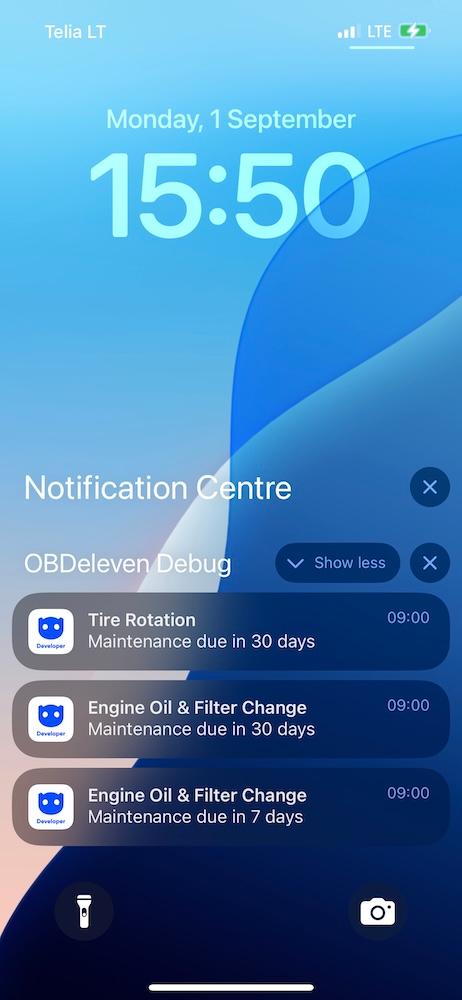
You’ll also see status labels, making it easy to spot what’s coming up:
- All good – no pending services
- Due soon – approaching tasks
- Needs attention – overdue items

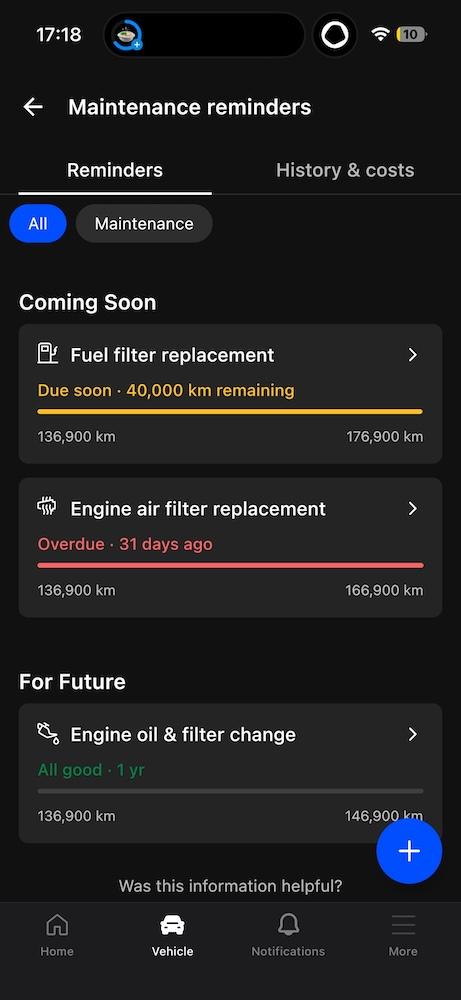
Here’s how to set it up:
1. Connect the device.
Plug OBDeleven into the OBD2 port, switch the ignition on, and open the OBDeleven app.
2. Open maintenance reminders.
Go to the "Maintenance reminders" section.
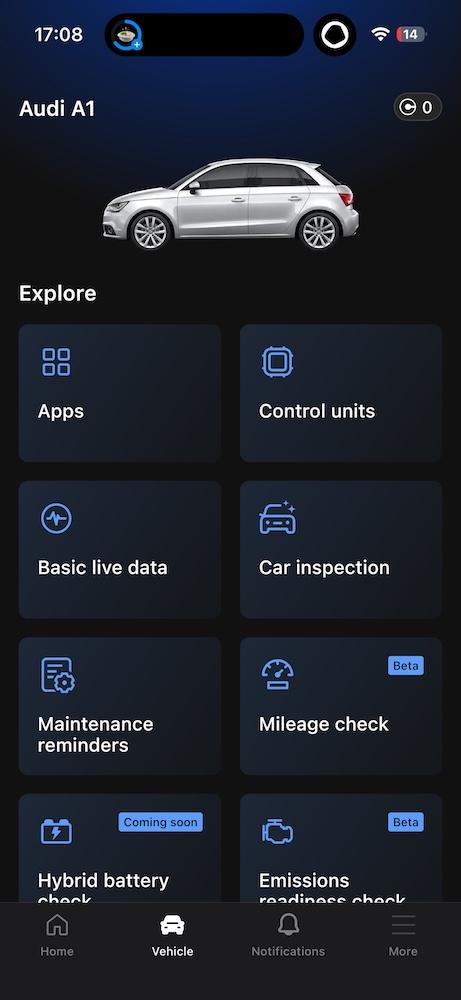
3. Add a new reminder.
Tap “+” at the bottom right. Pick a service from the list that appears.
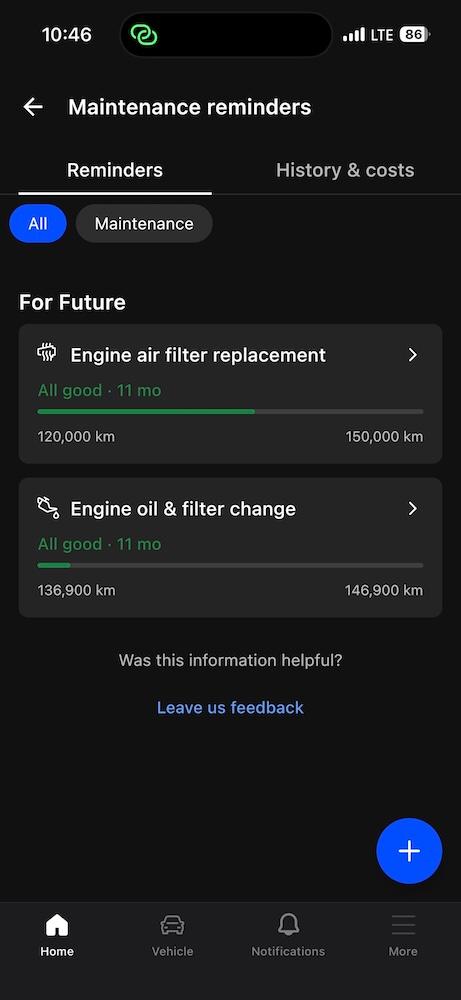
From here, you can make it entirely your own. Set reminders by date or specific mileage for anything your car may need – and add notes if you want to remember extra details. For the full step-by-step guide, please check out our FAQ via the button below.
other methods for setting maintenance reminders
A smartphone is great for keeping track of things. There are a couple of simple, so-called old-school ways you can stay on top of your car’s maintenance, too.
Using a built-in phone calendar
Open your calendar, create an event for the next service (for example, oil change or filter replacement), and set a reminder. It’s simple and already on your phone.
But there is a catch.
It is easy to swipe away the notification and forget about it – unless you set multiple reminders for every service. And if you do not know much about cars, you will need to Google each service interval and calculate the dates yourself.
Using generic maintenance apps
There are plenty of apps in the App Store, Google Play, and other marketplaces that help you log services and remind you when the next oil change is due.
They usually work better than a basic calendar, and some even give suggestions and handy summaries.
Note: We also tested several reminder apps and picked the best options – you can see our findings in this post on best maintenance reminder apps.
Here’s the deal though: both methods usually only know what you type in.
But if you want something that automatically reads your car’s mileage and can trigger maintenance reminders based on real data, you are better off using OBDeleven.
Why it’s better to set your car maintenance schedule with OBDeleven
OBDeleven doesn’t just use generic service intervals. It reads data from your specific car and tracks real mileage – so your maintenance reminders actually match how and where you drive.
Which means you can stay on top of parts that wear out as you rack up miles, not just as time passes. Think engine oil and filter, tire rotation and replacement, or timing belt – all of which depend heavily on driving distance.
For some other items, time-based reminders work best. Things like brake fluid, coolant, and battery health are usually checked every few years and backed up with inspections from your mechanic or an OBD scanner such as OBDeleven.
Here’s how it compares to other methods:
| OBDeleven | Smartphone calendar | Other apps | |
| Ease of use | Easy | Easy | Easy |
| Cost | Free, but requires OBDeleven device | Free | Mostly free, but may require additional devices, subscriptions or have ad breaks |
| Sends reminders | 30, 7, 1 day before | Flexible, depends on the smartphone | Depends on the app, most have various options |
| Type of reminders | Date-based and mileage-based | Date-based | Mostly date-based |
| Other car maintenance features | Yes | No | Mostly no, differs depending on the app |
Best practices to get the most out of OBDeleven car maintenance reminders
OBDeleven Maintenance reminders are built to be simple. But with a few tweaks, you can get even more out of them.
1. Keep mileage up to date
Connect OBDeleven at regular intervals so your mileage stays accurate. Run a quick scan from time to time. You will keep mileage fresh for your reminders and also spot new faults early, instead of waiting for a warning light.
Note: OBDeleven also comes in handy when you need to check a car’s mileage for fraud.
2. Use both time and mileage triggers
Do not rely on just one. Combine time-based and mileage-based triggers so you get reminded even if your driving habits change.
For example, oil change every 12 months or 10,000 km – whichever comes first.
3. Don't forget to log completed services
After the work is completed, mark the reminder as done and add a short note. You can also log completed services to maintain a full car service history, including: service date, mileage at time of service, cost and service location, parts used, and any other custom notes.
Why?
Because it builds a clear service history. When it is time to sell, you can show the buyer the car has been maintained on time making it easier to justify your price and build trust.
4. Review your reminders quarterly
Every few months, open your list of Maintenance reminders and remove services that no longer apply or add new ones if your driving or car setup has changed. This keeps your reminders relevant instead of noisy.
5. Use widgets on iOS and CarPlay
If you want to see what is coming up at a glance, add OBDeleven widgets to your iOS home screen and CarPlay.
They can show one or two upcoming reminders with the closest due dates right on your screen, so you can track services without opening the app. The number of reminders shown depends on the widget size you choose.
One app for stress-free car maintenance
Staying ahead of maintenance does not have to be complicated. With OBDeleven, you can set smart reminders based on time or real mileage, catch wear-and-tear before it becomes a bigger problem, and keep a clean service history that helps protect your car’s value when it is time to sell.
The best part – everything lives in one place: Maintenance reminders, quick diagnostics, Live data, and features like Mileage check.
Download the OBDeleven app, plug in your device, and set your first maintenance reminder today.


Dispositivo OBDeleven 3 + 200 Crediti
Include il dispositivo OBDeleven 3 e 200 crediti per sbloccare le funzioni dell’auto con le One-Click Apps
€114.99
Non è richiesto un piano a pagamento
Disclaimer: Advice, how-to guides, and car care tips on our blog are intended as helpful resources for general maintenance and repairs. While we strive for accuracy, the information is provided to the best of our knowledge and should be used at your own discretion and risk.
Always refer to your vehicle's owner's manual or consult a certified mechanic for specific repair details and safety procedures.
Always refer to your vehicle's owner's manual or consult a certified mechanic for specific repair details and safety procedures.