#Tools & plans
Every scan you run in OBDeleven is saved in the app. With CarPlay and Android Auto, you can now pull up your latest results directly on your car’s display.
A weak battery rarely warns you before it fails — it just dies. With OBDeleven on Android Auto, you can track its live voltage and status while you drive.
Here’s what you’ll need to use it:
1. Plug in the OBDeleven device to your car’s OBD2 port, so the device can read data from your car’s computer.
On the safety side, you no longer need to pick up your phone to see if something’s wrong. That means fewer distractions and more focus on the road.
Smarter diagnostics. More convenience. Less distraction. OBDeleven is now part of your everyday driving experience.
How to use OBDeleven on CarPlay or Android Auto


Cars keep getting smarter. But for drivers, making sense of all the sensors, alerts, and faults codes scan still feel complicated.
If you already use an OBD2 scanner, you know the drill: scan, get faults, check live data. All in your pocket on a smartphone.
That works great… until you’re on the road. Then it’s harder. And riskier. (Waze already told you not to type while you drive, right?).
So we fixed it. OBDeleven is now available on Apple CarPlay and Android Auto, putting your car’s key data right on the screen you already use every day. No juggling between apps, no reaching for your phone. Just the info that matters, exactly where you need it.
What you’ll see on the CarPlay & Android Auto

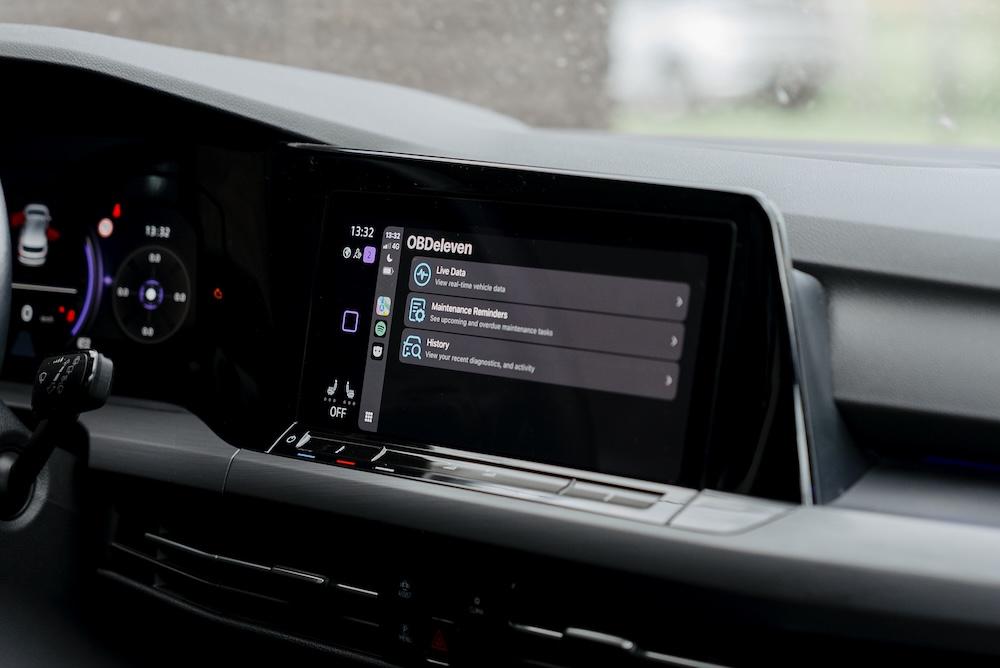
Live OBD2 data
For years, OBDeleven has shown you real-time values like RPM, coolant temperature, or battery voltage. The difference now is where you see them.
Instead of glancing at your phone, your car’s built-in display becomes a live dashboard. That means you can notice irregularities sooner – like a sudden coolant temperature spike on a hot day – without ever breaking focus from the road.
Further reading: How to read OBD live data
Maintenance reminders (CarPlay only)
CarPlay brings along something completely new: Maintenance reminders.
These are basically designed to help you stay on top of routine service and get on-screen reminders about things like oil change due, tire rotation or inspection dates, and other service intervals. So instead of relying solely on generic dashboard lights, you’ll see clear reminders (that you set yourself) via CarPlay.
Read more about maintenance reminders and find the full list of alerts in our FAQ article.
Note: Currently this feature is iOS-only; Android support is coming soon.
Scan history
Every scan you run in OBDeleven is saved in the app. With CarPlay and Android Auto, you can now pull up your latest results directly on your car’s display.
Say your check engine light comes on mid-trip. Instead of guessing, you can quickly check your recent scan history and see whether there were early warnings or fault codes pointing to the same issue. It helps you move from “something’s wrong” to “here’s what’s happening” in seconds.
Battery status (Android Auto only)
A weak battery rarely warns you before it fails — it just dies. With OBDeleven on Android Auto, you can track its live voltage and status while you drive.
That way, you’ll spot early signs of trouble, like weak charging or irregular drops, before you end up stuck with a car that won’t start. It’s a simple way to avoid one of the most common (and most annoying, for sure) roadside surprises.
Compatibility
Here’s what you’ll need to use it:
- Device: OBDeleven 3 – our latest device with faster scans and stable connectivity.
- App: OBDeleven app version 1.30.0 or newer (iOS & Android).
How to use OBDeleven on Apple CarPlay or Android Auto
1. Plug in the OBDeleven device to your car’s OBD2 port, so the device can read data from your car’s computer.
2. Connect your smartphone to the car’s infotainment system via USB or wireless – just as you normally use CarPlay or Android Auto.
3. Launch the OBDeleven app, which now has CarPlay/Android Auto support. The app will automatically project the OBDeleven interface onto your car’s display.
4. Interact using the car’s controls or voice. You can navigate OBDeleven’s CarPlay/Android Auto menus with your touchscreen, knobs, or steering wheel buttons.
Why it matters
On the safety side, you no longer need to pick up your phone to see if something’s wrong. That means fewer distractions and more focus on the road.
It’s also about convenience. For most people, the car’s built-in screen is the one they already interact with every day. Having car health information appear there, next to your navigation or music, means one less device to manage.
And then there’s peace of mind. With reminders for upcoming services and the ability to quickly check your scan history, you don’t have to wait for a warning light to wonder if something is due.
Most importantly, this is another step in OBDeleven’s evolution. The device started as a way to bring dealership-level diagnostics to your phone. Now, it’s becoming part of your car’s own interface – and this integration opens the door for even more features down the line.
Get your car’s health on the dashboard
Smarter diagnostics. More convenience. Less distraction. OBDeleven is now part of your everyday driving experience.


Appareil OBDeleven 3
Diagnostics gratuits illimités et données en direct pour les conducteurs du quotidien – fonctionne sans abonnement
€84.99
Pas de plan payant nécessaire