#Coding & customizations
Mercedes-Benz coding: What it is and how to unlock hidden features


TL;DR: Mercedes-Benz coding allows you to unlock hidden features by adjusting your car’s software settings. While traditional methods require technical knowledge, tools like OBDeleven simplify the process with ready-made One-Click Apps that you can activate in minutes. It’s an easy way to improve comfort, safety, and personalization.
Modern Mercedes-Benz vehicles come packed with features – but not all of them are enabled by default. Whether limited by region, trim level, or factory settings, many useful functions remain hidden. That’s where coding comes in.
Keep reading to find out what Mercedes-Benz coding (or Mercedes-Benz programming) is, why drivers use it, and how you can safely unlock additional features using tools like OBDeleven.
What is Mercedes-Benz coding?
Mercedes-Benz coding is the process of changing software settings in the car’s control units to enable, disable, or adjust certain vehicle functions.
These settings aren’t accessible through the dashboard or infotainment system, so you’ll need specialized tools and some technical knowledge to change them.
In practice, this can include:
- Comfort features – like automatic locking or mirror behavior
- Lighting settings – such as daytime running lights or interior light tweaks
- Service options – resetting intervals or adjusting maintenance settings
And more. The exact possibilities depend on your Mercedes model and the tool you’re using.
Why should you modify your Mercedes-Benz?
It’s worth considering Mercedes-Benz programming if you want a more personalized driving experience, as it allows you to tailor your vehicle’s features to better suit your needs and preferences.
Manufacturers often limit or hide certain features based on region, trim level, or regulations. Coding lets you unlock or adjust these settings – most drivers use it to improve safety, convenience, or the overall look of their vehicle.
Getting started depends on the method you choose. There are plenty of resources available online, along with specialized tools like OBDeleven that simplify the process. Some even offer pre-coded features, so all that’s left is selecting the function you want and activating it through a smartphone app.
That said, modifications made outside of a dealership may affect your warranty. It’s worth making sure the tool or specialist you choose is reliable and well-reviewed before making any changes.
Different tools for Mercedes-Benz coding
There are several ways to code a Mercedes-Benz. The tool you choose depends on how much control you want – and how comfortable you are with the process.
Official dealership or workshop
This is the most straightforward option.
Authorized workshops use official factory tools like XENTRY to perform coding and updates. This way, everything is usually done according to manufacturer standards.
The biggest downside may be the cost, as it can get higher compared to other options. Also, you’re limited to approved changes only, with no room to experiment if desired.
Professional coding specialists
Independent specialists offer more flexibility than dealerships. They usually can unlock more hidden features, handle retrofits, and perform custom configurations.
However, results depend heavily on the provider. You’re relying on their expertise, and finding a trusted specialist can take time.
Also, keep in mind that some workshops use tools like OBDeleven themselves and may charge extra for customizations you could potentially perform on your own, often at a much lower cost.
DIY coding with advanced software
DIY coding is pretty self-explanatory – it’s an option that gives you the most control, but also the most risk.
In this category, tools like Vediamo or DTS Monaco allow deep access to control units and settings. With them, you can customize nearly anything.
However, they’re not beginner-friendly, require solid technical knowledge, and equipment has a high upfront cost. If you choose to go this route, also be prepared for a steep learning curve – mistakes can cause system errors or unexpected behavior.
Beginner-friendly coding apps and tools
One of the newest innovations for Mercedes-Benz programming combines an OBD2 device with a smartphone app. These solutions offer simplified, pre-coded functions that you can browse in a catalog and activate instantly.
No manual coding, no complex configurations – and a lower risk of errors, since each feature is tested by engineers before being released.
It’s a great option if you want quick, safe customization for your Mercedes-Benz without getting into advanced setups. OBDeleven 3 offers this through its signature One-Click Apps format, making it easy to activate specific features at a fraction of the cost compared to dealership solutions.
What are One-Click Apps?
As an officially licensed partner of Mercedes-Benz, OBDeleven has a wide catalog of pre-configured coding features called One-Click Apps. These are tailored to a wide range of models and come in the form of ready-made in-app toggles that can be activated using Credits or included with the ULTIMATE plan.
One-Click Apps are currently available for Volkswagen Group, select BMW Group, Ford Group (for the USA), Mercedes-Benz, and Toyota Group vehicles. Availability depends on your vehicle’s equipment. You can activate One-Click Apps with our in-app currency, Credits, or make them nearly unlimited with the ULTIMATE plan.
The One-Click Apps library covers everything from infotainment and UI customization to driving behavior, usability, safety, and exterior and interior lighting. All you need is an OBDeleven 3 device and a couple of minutes.
Getting started with Mercedes-Benz programming using OBDeleven is quick and straightforward. Follow these simple steps to activate your desired features in minutes:
1. Plug the OBDeleven device into your car’s OBD2 port, open the OBDeleven app, log in, and connect to your vehicle.

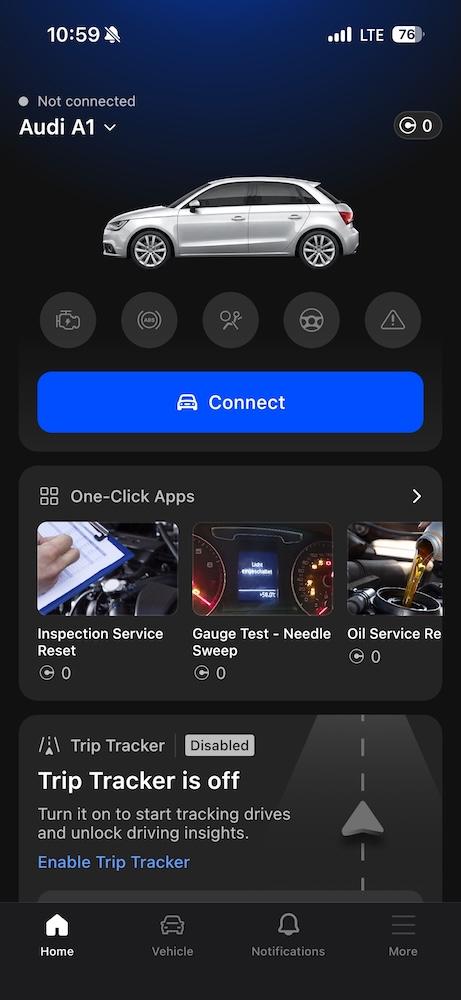
2. Tap or scroll One-Click Apps widget to browse the available features.
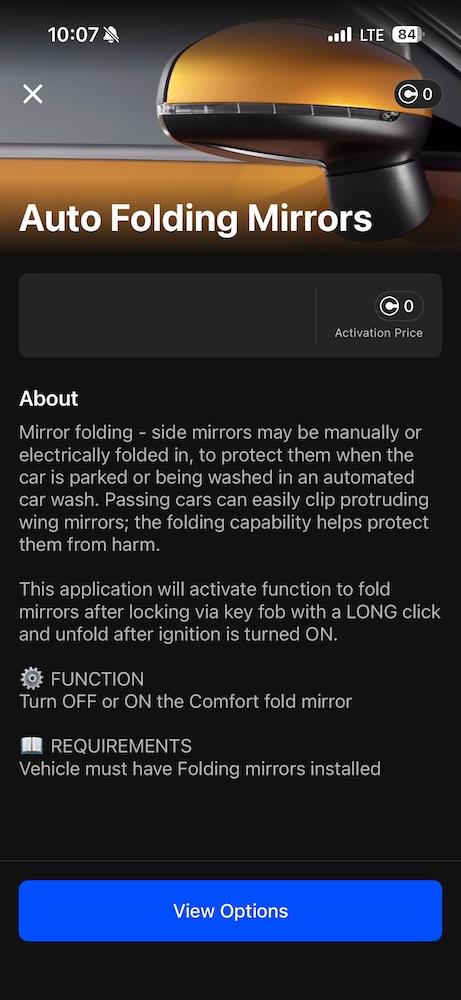
3. Choose the function you want, tap View Options, and then Activate.
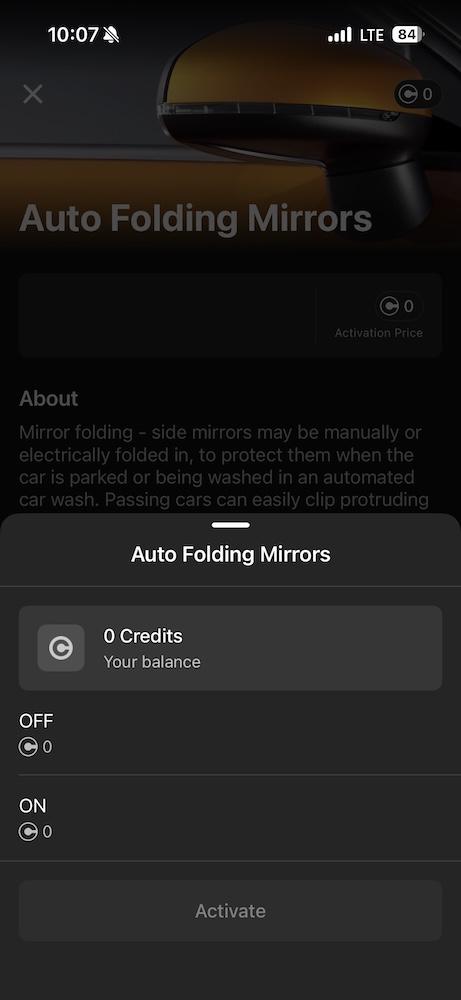
For the full guide, see our One-Click Apps: A to Z blog post.
Popular Mercedes-Benz features you can unlock with One-Click Apps
We’ve selected a few of the most popular features that Mercedes-Benz drivers enjoy – explore what each does and get inspired.
Start/Stop Deactivation
Disables the automatic engine start/stop system, so the engine won’t shut off at stops unless you choose to enable it again.
Comfort Turn Signals Count
Lets you adjust how many times the turn signal blinks with a light tap, making lane changes more convenient and tailored to your preference.
Scandinavian DRL
Keeps the rear lights on together with daytime running lights, improving vehicle visibility in low-light or poor weather conditions.
Explore the full article we’ve prepared for most popular Mercedes-Benz One-Click Apps here.
Make your Mercedes-Benz truly yours
Mercedes-Benz coding opens the door to a more personalized driving experience – from practical improvements to subtle visual upgrades.
And when it comes to effortless programming, OBDeleven 3 is one of the easiest ways to get started. With one compact device, you can access convenient customizations, full diagnostics, and a range of additional ownership features.
Getting more out of your vehicle has never been easier with OBDeleven 3. Try it today to unlock what’s hidden.

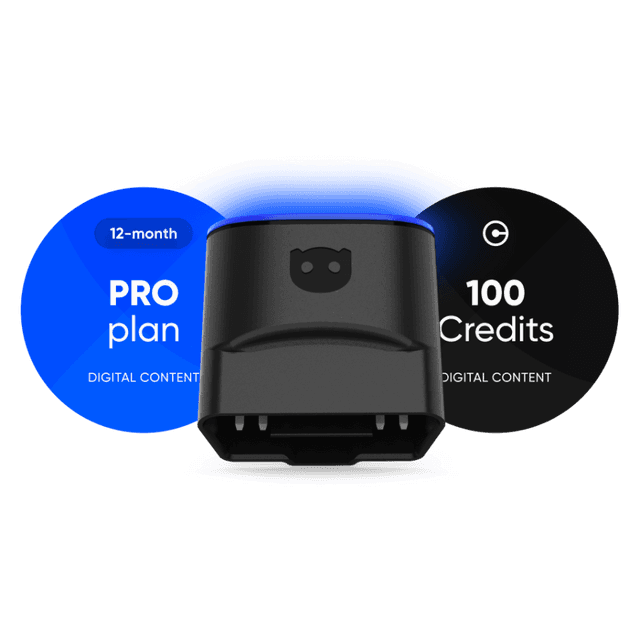
OBDeleven 3 PRO Pack + 100 Credits
Includes OBDeleven 3 device, PRO plan (12-month), and 100 Credits for unlocking car features with One-Click Apps
€139.99