#Diagnostics & troubleshooting
IDS requires:
With OBDeleven 3, you’ll get the latest diagnostic technology, new features added monthly, a smart energy-saving mode, and a wide range of supported car models, including those beyond Ford.
Ford diagnostics: all you need to know (+ how to do it for cheap)


TL;DR: Ford diagnostics can be done with different tools, from official dealer-level software like IDS, FDRS, and FJDS to simple OBD2 scanners and app-based tools like OBDeleven. The best option depends on what you need: basic fault code reading, full-system scans, live data, module access, or professional repair functions. In this guide, we explain the main Ford diagnostic tools and software options, when a laptop-based setup makes sense, what free Ford diagnostic software can and can’t do, and how OBDeleven 3 offers a simpler way to scan Ford vehicles from your phone.
You’re cruising in your Ford when ding! A warning light appears.
And while dashboard lights might give you a heads-up, they rarely tell the whole story.
Beneath is a complex network of Electronic Control Units (ECUs) and sensors, all constantly communicating, adjusting, and logging data. To get to the root of the problem, you’ll need to translate all of that into the human language using a chosen Ford diagnostic software.
That’s where Ford diagnostics can help. Once limited to official dealerships with expensive, bulky equipment, modern diagnostic and repair systems are now more accessible than ever.
With the help of the right tools, suspicious dashboard lights or rattles can be much more easily investigated at home.
But how do you do that? And which diagnostic tools are the best? Keep reading and we’ll help you figure it out.
What is Ford diagnostic software?
Ford diagnostic software is a specialized program that helps you communicate with your vehicle’s onboard computer and check what is happening inside your Ford. It works together with a diagnostic tool that connects to your vehicle, usually through the OBD2 port.
Depending on the tool, it can help you find out why a warning light is on, read and clear fault codes, check live vehicle data, and scan different car systems.
For example, app-based tools like OBDeleven 3 make diagnostics accessible from your phone, laptop-based software like FORScan is popular among Ford enthusiasts, and professional tools like Ford FDRS, IDS or FJDS are often used by repair shops and dealers.
Can you get Ford diagnostic software for free?
Yes. Some Ford diagnostic software is free to download, and one of the best-known options is FORScan. However, free does not always mean you only need the software.
FORScan still requires compatible hardware, such as a supported OBD2 adapter. While some ELM327-compatible adapters may work, cheap or outdated adapters may not support all Ford communication protocols or newer FORScan functions – especially for deeper diagnostics, module access, or configuration. Also keep in mind that some advanced FORScan functions may require an Extended License, available as a free trial or paid license.
What diagnostic tools do Ford drivers use today?
Ford drivers today usually fall into four diagnostic tool groups: everyday owners using basic OBD2 scanners, DIY drivers using app-based scanners, Ford enthusiasts using FORScan with an adapter, and workshops or dealers using professional Ford diagnostic tools. Here's how they compare:
| User type | Ford diagnostic tools used | Purpose |
| Casual For owner | Basic OBD2 scanner or app-based scanner | Check-engine light diagnosis, simple fault codes |
| Everyday DIY driver | Advanced OBD2 scanners like OBDeleven 3 | Easier app interface, more thorough diagnostics, live data, pre-coded customizations |
| Ford enthusiast | FORScan + OBDLink EX/MX+ | Ford-specific module access and configuration |
| Repair shop/dealer | Ford FDRS/IDS/FJDS, Autel, Launch | Advanced diagnostics, service functions, programming |
These tools vary greatly in price, functionality, and ease of use. And while taking your car to a local repair shop may seem like the obvious first step when you hear a suspicious rattle, it isn’t always the smartest move. Diagnostics at repair shops or authorized dealerships can get expensive really fast, easily costing you a Ford diagnostic fee ranging from $75 to as much as $255.
What’s worse is that even after such a costly scan, you may find out that the issue was very minor or not there at all. This is because dashboard lights could mean anything from a loose gas cap to a misfiring cylinder.
So, what can you do instead? Let’s take a look at the most popular current options.
Ford IDS/FDRS
Ford IDS (Integrated Diagnostic Software) is the official dealership-level diagnostic software by Ford Motor Company. With IDS, you can run vehicle diagnostics, diagnose issues, read and clear faults, and reprogram modules.
Typically, it’s used by technicians in dealerships and authorized service centers. And that’s for a reason.


IDS requires:
- A paid subscription,
- A computer running Windows,
- A Ford-approved VCM (Vehicle Communication Module) device.
To use it, you’ll have to connect the VCM to your car and the laptop to run tests, clear fault codes, and control various vehicle modules. So, while officially approved and extremely useful, it’s a bit of overkill for regular drivers.
Not to mention the setup will set you back at least $1,000.
There’s also FDRS Ford diagnostics – a new type of cloud-based diagnostic and repair system for modern (2018 and newer) Ford vehicles. It’s more convenient but still requires the same basic setup.
That said, IDS and FDRS are built for professional use. Let’s move on to more user-friendly options.
DiagNow app
As an alternative, Ford offers a DiagNow mobile app for regular drivers who want to get an in-depth understanding of their cars.
DiagNow allows you to read and decode the vehicle’s VIN (Vehicle Identification Number), as well as read and clear diagnostic fault codes.
There’s a catch, though.
The app not only requires a paid subscription to work but also a VCM Lite device – a streamlined version of VCM used in dealerships. Its cost? Around $500.
OBD2 devices
OBD2 (On-Board Diagnostics, version 2) tools are more user-friendly diagnostic devices for Ford. An OBD2 scanner plugs into the car’s OBD2 port and lets you communicate with the vehicle’s computer.
Typically, you’ll encounter two types of OBD2 scanners: handheld devices with a screen or ones that transmit data to your smart device via Bluetooth/Wi-Fi.
Handheld devices are what you’d typically see a mechanic at a workshop use – it’s a tablet-like device with a dongle that connects to the car’s OBD2 port. While it’s bulky, it does the job without any additional tools. However, they tend to be expensive.


Bluetooth/Wi-Fi OBD2 scanners are a more convenient option, as it's a small device that plugs into your car and transmits data to your phone or tablet.
However, it’s important to distinguish basic OBD2 code readers from more advanced diagnostic scanners. While basic scanners can scan your Ford and show standard fault codes, they usually can’t access Ford-specific systems, such as the BCM or hybrid powertrain modules. We’ve covered this topic in more detail in our article about the best OBD2 scanners for Ford in 2026.
OBDeleven 3 – the easiest & most budget-friendly solution
If you’re a car enthusiast or an everyday driver who wants control, not complexity, we have a brand new option for you – OBDeleven 3.
It’s as simple as advanced car diagnostics can be. For a one-time payment, you can get unlimited diagnostics operated straight from your phone.
Just plug in, connect via Bluetooth and run a check whenever something seems off with your Ford.
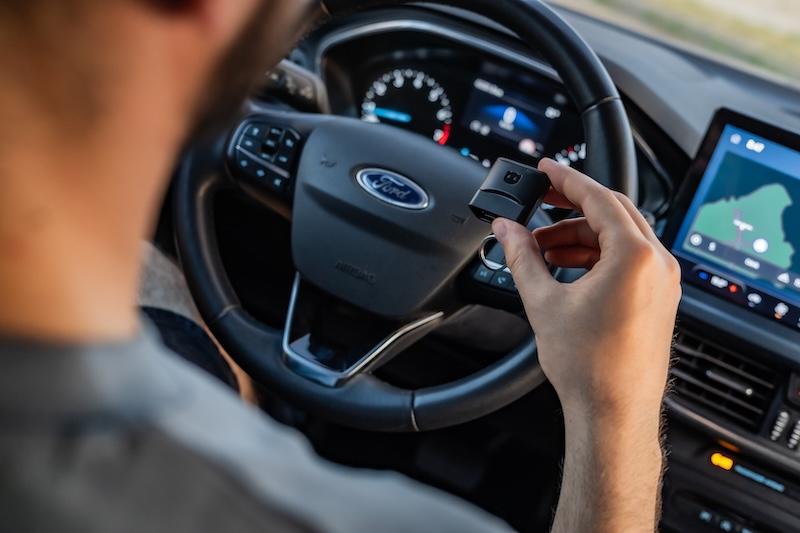
Here’s what sets it apart:
- Officially licensed for Ford Group vehicles (US models): OBDeleven is certified to access all of your vehicle’s control units, just like dealership tools.
- App-based and wireless: There are no cables or laptops. Plug the device into your Ford’s OBD port, connect to your smartphone via Bluetooth, and manage everything on the OBDeleven app.
- Full-system diagnostics: Scan every available control module, from the engine and transmission to airbags to brakes, and more.
- One-Click Apps: One of the key distinguishing features of OBDeleven are pre-coded customizations – One-Click Apps. With them, you can enable hidden features with a single tap.
In short, it’s dealership-grade insight but simplified for everyday use.
Important note: For Ford Group vehicles, advanced diagnostics and One-Click Apps are currently available only for models manufactured in the US.
What OBDeleven 3 can do for your Ford
Scan all AVAILABLE control units
OBDeleven doesn’t stop at engine diagnostics. It scans every accessible control unit in your Ford – including ABS, airbags, HVAC, and more. You get a complete overview of your car’s internal systems.
Read and clear fault codes
When a warning light appears, OBDeleven 3 displays let you decode it with a scan, providing you with a fault code together with a description. When the fault’s minor, you can easily clear it with just one tap.
In critical cases, a scan can help you determine the best course of action or have a more informed discussion with your car technician.
View live data
You don’t have to wait for the dashboard light to flash. OBDeleven 3 lets you to proactively read OBD live data, such as engine RPM and coolant temperature. With this, you can catch minor issues before they become serious.
Customize with One-Click Apps
Want to enable auto-locking doors or change how your daytime running lights behave?
One-Click Apps let you customize your Ford, as well as unlock hidden features without any manual coding.
One-Click Apps let you customize your Ford, as well as unlock hidden features without any manual coding.
How OBDeleven 3 compares to other Ford diagnostic options
You might still be wondering which diagnostics type is the right choice for your Ford.
That’s fair. To make your choice easier, we’ve prepared a quick overview table below, summarizing the general differences.
| OBDeleven 3 | Ford IDS/FDRS | DiagNow App | Generic OBD2 scanners | |
| Price | Affordable, starting at €84.99 | Expensive, $1,000 setup +subscription | Approximately $500 for VCM Lite + in-app subscription | Varies, often affordable |
| Platform | App-based | Windows PC-based, handheld | App-based | Handheld/Bluetooth/Wi-Fi |
| Ease of use | Easy, app-guided | Dealership-grade, requires extensive knowledge | Moderate | Easy to moderate |
| Diagnostics capability | Full-system diagnostics, with an expanding feature set | Full-system diagnostics | Limited diagnostics | Basic diagnostics, not Ford-specific |
| Cuztomization | One-Click Apps for code-free customization | Coding required | Limited customization | Usually none |
With OBDeleven 3, you’ll get the latest diagnostic technology, new features added monthly, a smart energy-saving mode, and a wide range of supported car models, including those beyond Ford.
Disclaimer: Advice, how-to guides, and car care tips on our blog are intended as helpful resources for general maintenance and repairs. While we strive for accuracy, the information is provided to the best of our knowledge and should be used at your own discretion and risk.
Always refer to your vehicle's owner's manual or consult a certified mechanic for specific repair details and safety procedures.


OBDeleven 3 device + 200 Credits
Includes OBDeleven 3 device and 200 Credits for unlocking car features with One-Click Apps
€114.99
No paid plan required